Finding the best drawing tablet for professionals can feel overwhelming. You want the right tool to bring your ideas to life, but the options seem endless and it’s easy to get lost in details.
There are many types of drawing tablets. Some work only when connected to a computer, while others are standalone. Some have screens that let you draw directly, others are blank pads that take more getting used to. Pressure levels, pen technology, screen quality, shortcut keys, and compatibility all play a role, and it’s not always clear which features matter most for your work.
Prices range widely, too. Saving money might mean giving up a nicer screen or smoother workflow. Going premium could mean paying for features you’ll never use.
This article will help you weigh these choices so you can pick the tablet that truly fits how you create.
What Actually Matters When Choosing
Think about how and where you usually work. If you move between spaces or want to draw anywhere, portability and whether a tablet needs a computer might matter most. If color accuracy is key for your projects, pay attention to screen quality and calibration.
Some artists rely on shortcut keys and dials for speed, while others prefer a simple, clean workspace. Comfort with the pen is also personal, some people need tilt and high pressure sensitivity, others just want a pen that feels good in the hand.
Below, you’ll find a range of drawing tablets, each with different strengths. They’re compared by how they match common needs, so you can see which one aligns with your style and workflow.
Xppen Artist 13.3 Pro Drawing Tablet
Best Drawing Tablet for Professionals seeking high color accuracy and customizable workflow for digital art and design.

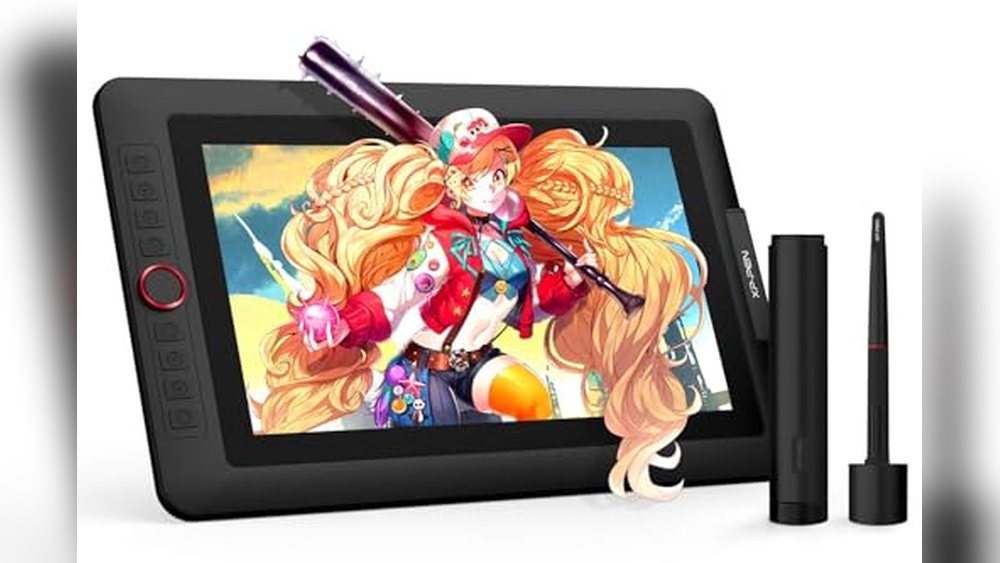
The XPPen Artist 13. 3 Pro Drawing Tablet is a full-laminated graphics tablet with a vibrant 13. 3-inch screen and advanced pen pressure sensitivity. Designed to be used with your computer, it offers smooth brush transitions and tilt functionality, making it a strong solution for illustrators and designers looking for natural drawing experiences and color precision.
With its handy red dial and eight customizable shortcut keys, the tablet streamlines creative workflows. You can easily zoom, adjust brushes, or flip your canvas without breaking your rhythm. The adjustable stand and wide software compatibility mean you can set up quickly and get right to work, no fuss, just reliable performance.
- Strengths:
- Superb color accuracy (123% sRGB, 88% NTSC)
- Customizable shortcuts for efficiency
- Tilt support for natural shading
- Works with Windows, macOS, Chrome OS, Linux
- Wide creative software compatibility
- Limitations:
- Requires connection to a computer (not standalone)
- Size may be small for artists preferring larger canvases
Who Will Benefit Most
If you’re a digital artist or designer who values color fidelity and workflow customization, this tablet will fit right into your setup. It’s ideal for professionals who use multiple creative programs and appreciate quick-access shortcuts. Beginners may find the learning curve manageable, but those needing a standalone device should look elsewhere.
The XPPen Artist 13. 3 Pro helps reduce the stress of setup and compatibility, just connect to your computer and start creating. For best results, keep your workspace organized and use the adjustable stand for comfort during long sessions. You can be confident knowing this tablet supports major software and offers real creative control without unnecessary complexity.
Wacom Intuos Pro Medium Bluetooth Drawing Tablet
Best Drawing Tablet for Professionals seeking precision, comfort, and reliability in digital art and graphic design.

The Wacom Intuos Pro Medium is a professional-grade drawing tablet designed for artists and designers who demand high accuracy and comfort. Its Pro Pen 3 delivers 8192 pressure levels, tilt support, and lag-free tracking, making it possible to achieve natural, pen-like strokes whether sketching, illustrating, or retouching photos.
The tablet feels sleek and sturdy, with a magnesium build that’s durable enough for studio or travel. The customizable ExpressKeys and mechanical dials streamline workflow, so you can stay focused on your creative process. The wireless Bluetooth connectivity lets you switch between multiple computers without extra cables or hassle.
- Strengths:
- Exceptional pen precision and customizable grip
- 10 ExpressKeys & 2 dials for enhanced productivity
- Large active area in a compact footprint
- Wireless and USB connectivity
- Built for durability and portability
- Limitations:
- Medium size may not suit those who prefer extra-large surfaces
- No built-in display, requires external monitor
Is This The Right Tablet For You?
If you’re a professional illustrator, designer, or photographer who values precision and a streamlined workflow, the Wacom Intuos Pro Medium is built for you. It removes the stress of unreliable pen pressure and awkward ergonomics, giving you confidence with every stroke.
Beginners may find the features more than they need, but for experts, it’s a reliable tool that keeps up with demanding projects.
If you prefer drawing directly on a screen or need a larger workspace, consider other options. For everyone else, a practical tip: take advantage of the customizable ExpressKeys to tailor shortcuts for your favorite software. You can trust that this tablet will fit seamlessly into your daily routine and help you focus on what matters most, creating.
Xppen Deco 01 V3 Drawing Tablet
Best Drawing Tablet for Professionals seeking a reliable, spacious digital art platform that’s great for both beginners and experienced artists.

The XPPen Deco 01 V3 Drawing Tablet offers a generous 10 x 6. 25-inch workspace and a battery-free stylus with world-first 16,384 pressure levels, making it ideal for digital artists who value precision and comfort. The eight customizable hotkeys and compatibility with Chrome, PC, Mac, and Android ensure seamless workflow, especially for those who need flexibility across devices.
Using this tablet feels intuitive and responsive, whether sketching, painting, or editing. The pressure sensitivity delivers smooth, natural lines, and the easy connectivity means setup is quick, even for beginners. The large drawing area helps with detailed work and reduces the need to zoom or pan.
- Strengths:
- Exceptional pressure sensitivity (16,384 levels) for nuanced art
- Large drawing space for unrestricted creativity
- Works with Android devices and multiple platforms
- Battery-free stylus eliminates charging worries
- Ambidextrous hotkeys cater to both left- and right-handed users
- Limitations:
- No built-in screen, requires an external display
- May feel oversized for strictly mobile use
| Feature | Benefit |
|---|---|
| 16,384 Pressure Levels | Highly sensitive strokes for professional artwork |
| 10 x 6.25″ Drawing Area | Spacious workspace for larger projects |
| Android Compatibility | Draw on the go with mobile devices |
Is This Tablet Right For You?
If you’re a professional artist or a digital art enthusiast who values precision and comfort, the XPPen Deco 01 V3 is an excellent choice. Its large surface and advanced stylus make it perfect for detailed illustration, design, and even teaching or gaming.
The straightforward setup removes confusion and lets you focus on creativity rather than troubleshooting.
Those seeking a tablet with a built-in display or needing a more compact device for frequent travel might want to look elsewhere. However, for studio work and multi-device connectivity, this tablet stands out. A practical tip: customize the shortcut keys for your favorite software to speed up your workflow.
Rest assured, the Deco 01 V3’s battery-free stylus and wide compatibility mean you won’t have to worry about interruptions or device limitations. It’s a reliable, stress-free investment for anyone serious about digital art.
Huion Kamvas Pro 16 Drawing Tablet
The Best Drawing Tablet for Professionals, ideal for digital artists and designers seeking a reliable pen display for creative work.

The Huion Kamvas Pro 16 is a professional-grade graphics tablet with a vibrant 15. 6-inch full-laminated screen and anti-glare glass, designed for precise drawing, writing, and design tasks. Its high color accuracy and sharp detail are particularly helpful for artists and illustrators who need true-to-life visuals and minimal distractions from glare.
With customizable express keys and a responsive, battery-free pen, the Kamvas Pro 16 streamlines creative workflows and reduces the time spent on repetitive tasks. Its adjustable stand allows for comfortable long sessions, making it easy to focus on your work without worrying about neck or back strain.
- Strengths:
- Excellent color accuracy and clarity
- Customizable shortcuts for efficiency
- Comfortable adjustable stand
- Reliable pen performance with tilt support
- Works with Windows, Mac, and Linux
- Limitations:
- Requires connection to a computer
- No built-in wireless functionality
Who Will Appreciate This Tablet?
If you spend hours drawing or designing, the Kamvas Pro 16 is a practical choice for professionals who value accuracy, comfort, and speed. It removes the guesswork around color representation and shortcut customization, letting you focus on creativity rather than setup.
Beginners may find the features overwhelming, but experienced users will appreciate the streamlined workflow and ergonomic design.
For best results, set up the adjustable stand to match your preferred angle before starting a long session. Rest assured, the anti-glare glass and smooth screen texture make every stroke feel natural and easy, so you can work confidently without eye strain or discomfort.
Xppen Magic Drawing Pad 12.2″ Standalone
Best Drawing Tablet for Professionals seeking a standalone, high-precision tool for digital art without needing a computer.

The XPPen Magic Drawing Pad 12. 2″ Standalone is a premium digital drawing tablet designed for professionals who want the freedom to work anywhere, without being tethered to a computer. Its standout feature is the X3 Pro slim stylus with 16,384 pressure levels, double what most tablets offer, delivering ultra-precise, nuanced input for advanced creative work.
This tablet feels natural and responsive, thanks to its paper-like anti-glare screen and TÜV-certified eye comfort. The device runs on Android 14, so you can install your favorite art apps directly and take advantage of generous storage for large project files.
It’s easy to pick up and sketch, edit, or finish artwork with minimal setup and maximum reliability.
- Why artists love it:
- Truly standalone, no computer required
- Ultra-responsive stylus with 16K pressure sensitivity
- Paper-like, color-accurate 12.2″ display (115% sRGB)
- Eye comfort features allow hours of work without strain
- Expandable 256GB storage (up to 1TB micro SD)
- Bonus: 3 months Clip Studio Paint & ibis Paint X
- Consider before buying:
- Runs Android apps, may not replace desktop-only workflows
- No built-in desktop OS support
Is The Xppen Magic Drawing Pad Right For You?
This tablet is ideal for professional illustrators, animators, and designers who want a portable, fully-featured device that delivers desktop-level precision. If you value working untethered, whether in the studio, at a café, or on the go, and don’t require desktop software, it will streamline your creative process and reduce technical headaches.
However, if your workflow depends on specific desktop applications, or you need a device that doubles as a traditional computer, you might want to look elsewhere. For most digital artists, though, this tablet removes the stress of cables and compatibility, letting you focus on what really matters: your art. For best results, get a sturdy case and a large micro SD card to keep your projects secure and organized.
Xp-pen Artist 12 3rd Gen Drawing Tablet
The Best Drawing Tablet for Professionals seeking portability and precision, ideal for digital artists, illustrators, and designers who need top-tier performance across multiple platforms.

The XP-Pen Artist 12 3rd Gen is a lightweight, ultra-portable drawing tablet with a high-quality screen and professional X4 pen, designed to make digital art creation smooth and intuitive. With dual dial wheels and 8 customizable keys, it dramatically reduces the time spent on repetitive tasks, so artists and professionals can focus on their creative flow rather than wrestling with software controls.
Its paper-like AG etched glass display is gentle on your eyes, even during long work sessions, and the full lamination makes the pen feel precise and natural. Whether you’re sketching in a café, editing photos, or working on brand designs, the tablet’s accurate color reproduction and near-zero parallax give you the confidence that what you see is what you get, no surprises, just reliable results every time.
- Strengths:
- Ultra-portable and lightweight for easy travel
- Exceptional pen precision with 16,384 pressure levels
- Paper-feel, eye-friendly display for comfortable long sessions
- Universal compatibility: Windows, macOS, Android, ChromeOS, Linux
- Factory-calibrated color accuracy for professional projects
- Potential Limitations:
- 11.9-inch screen may feel small for those who prefer large canvases
- No built-in stand; external stand recommended for desk use
Is This Your Next Professional Drawing Tablet?
If you’re a digital artist, illustrator, or designer who values precision, portability, and compatibility, the XP-Pen Artist 12 3rd Gen will simplify your workflow and reduce eye strain during marathon creative sessions. It’s especially useful for those who need a reliable tablet that can travel easily and perform flawlessly across different operating systems and creative software.
If you prefer a larger working area or require a built-in stand, you may want to look at bigger models. For everyone else, this tablet removes the stress of color accuracy and pen lag, letting you focus on your art instead of technical hassles. Tip: Pair it with a foldable stand for the best ergonomic experience on the go.
Rest assured, this device is built for demanding professionals but is accessible enough for students and hobbyists who want to take their digital art to the next level.
Huion Kamvas 13 Gen 3 Drawing Tablet
The Best Drawing Tablet for Professionals, ideal for artists and designers who demand precise color accuracy and a natural pen-on-screen experience.

The HUION Kamvas 13 Gen 3 is a 13. 3-inch drawing tablet with a fully laminated display and anti-sparkle canvas glass, making it a compelling choice for professional creators who value clarity and precision. Its standout feature is 16384 levels of pen pressure with advanced PenTech 4.
0, giving you ultra-responsive and natural pen strokes for detailed illustration or design work.
In day-to-day creative projects, the Kamvas 13 Gen 3 delivers a comfortable and reliable drawing experience. The color accuracy (99% sRGB and factory calibration) means what you see on the screen matches your final output, so you can work with confidence and minimize guesswork during editing or review sessions.
- Strengths:
- Exceptional color accuracy and calibration for professional results
- Fully laminated, glare-reducing display for comfortable long sessions
- Extremely sensitive and responsive pen with customizable side buttons
- Works with PC, Mac, and Android
- Limitations:
- Must be connected to a computer or compatible device, this is not a standalone tablet
Is The Kamvas 13 Gen 3 Right For You?
If you’re a digital artist, designer, or illustrator looking for a high-quality drawing tablet that delivers accurate color and a true pen-on-paper feel, the HUION Kamvas 13 Gen 3 is a strong fit. It’s especially useful for professionals who need their work to look consistent across devices and in print, removing the stress of color mismatches and unreliable lines.
However, if you need a standalone device for on-the-go work without a laptop or computer, this model won’t be the right choice. For those who work mainly at a desk and want a reliable, comfortable drawing experience, this tablet will help you focus on your art, just remember to keep your device drivers updated for the best performance.
Picassotab X11 Standalone Drawing Tablet
A top pick for Best Drawing Tablet for Professionals, ideal for artists seeking a portable, all-in-one solution without needing a computer.

The PicassoTab X11 is a standalone drawing tablet designed for professionals who value mobility and simplicity. Its fully laminated 11″ 2K screen delivers a natural, paper-like drawing experience and eliminates the need for a computer, making it easy to start creating anywhere.
The inclusion of premium drawing apps and lifetime tutorial access helps users move from sketching to animating with confidence.
Working with the X11 feels intuitive and seamless, especially for those who want to draw on the go or in various environments. Setup is minimal, and everything needed, stylus, glove, case, screen protector, and charger, is included, so you can focus on your art rather than technical details.
The hardware is powerful enough for demanding projects, and the device doubles as an entertainment tablet when you need a break.
- Strengths:
- Truly portable, no computer required
- Paper-like laminated display reduces glare and parallax
- Includes lifetime access to drawing tutorials
- Comes with top drawing apps and full accessory kit
- Octa-Core CPU and 6GB RAM for smooth multitasking
- Limitations:
- Screen size may be small for users who prefer larger canvases
- Only basic versions of some apps included
Is This Tablet Right For You?
If you’re a professional artist or designer who needs a reliable, portable drawing solution, the PicassoTab X11 fits perfectly. It removes the stress of connecting to external devices or managing complex setups, so you can sketch, illustrate, and animate anywhere.
Beginners will appreciate the included tutorials and apps, while experienced users will enjoy the responsive stylus and premium screen.
If you need a larger screen or advanced desktop apps, you might want to look elsewhere. For most, however, this tablet offers a hassle-free, all-in-one digital art experience. A practical tip: keep the glove and screen protector handy for extended drawing sessions, they make a real difference in comfort and screen longevity. Rest assured, the X11 is built for both creative exploration and professional reliability.
Xp-pen Artist 16 Pen Display Tablet
A top pick for Best Drawing Tablet for Professionals, ideal for digital artists who demand high color accuracy and seamless workflow controls.
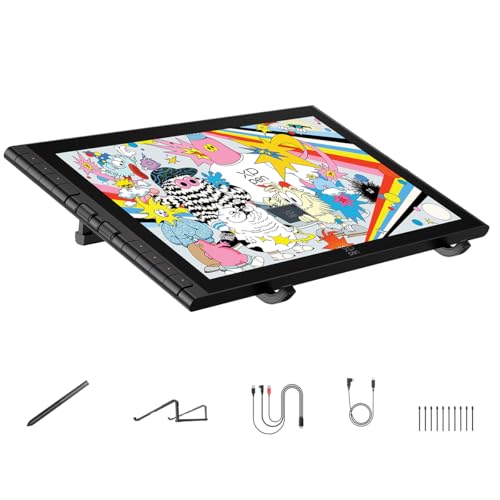
The XP-Pen Artist 16 is a professional drawing tablet with a built-in screen, designed to solve the common frustrations of pen lag, parallax, and workspace clutter. Its innovative 16K pressure stylus and anti-glare etched glass provide a natural, paper-like feel while keeping your lines smooth and precise.
If you often struggle with accuracy or color fidelity in your creative work, the Artist 16 stands out thanks to its nearly perfect parallax reduction and vibrant color coverage.
Using this tablet feels intuitive, especially during long sessions. The dual scroll wheels and customizable hotkeys streamline your workflow, letting you focus on creating rather than fiddling with settings. The foldable stand offers ergonomic support, so you can draw comfortably for hours without neck strain.
Compatibility with both Mac and Windows, as well as Android and Linux, means you can trust it to fit into almost any professional setup.
- Strengths:
- Exceptional stylus accuracy and pressure sensitivity (16,384 levels)
- 99% sRGB, 98% Adobe RGB, 97% Display P3 coverage for color-critical work
- Anti-glare, fully laminated screen for natural drawing and minimal parallax
- Dual scroll wheels and 8 customizable hotkeys for rapid workflow
- Wide compatibility: Mac, Windows, Android, ChromeOS, Linux
- One-cable USB-C setup reduces desk clutter
- Includes foldable ergonomic stand
- Limitations:
- Tablet size (15.4″) may be bulky for tight workspaces
- No explicit mention of wireless connectivity
Who Will Benefit Most
If you’re a professional illustrator, animator, or designer seeking a drawing tablet that delivers precision and comfort, the Artist 16 is a reliable choice. The high color accuracy and ergonomic features help eliminate stress over workflow interruptions and visual inconsistencies.
Beginners or hobbyists might find the features more than they need, but for demanding creative tasks, this tablet’s smooth stylus and easy shortcut controls make a real difference.
Those who switch between multiple devices or creative software will appreciate its broad compatibility and simple cable management. If you’re upgrading from a non-screen tablet, give yourself time to adjust to the pen display, once you do, you’ll likely wonder how you managed without it.
Take advantage of the customizable keys and scroll wheels for a faster, more enjoyable art process.
Huion Kamvas 13 Gen 3 Drawing Tablet
Best Drawing Tablet for Professionals who need accurate color and a paper-like drawing experience for digital art.
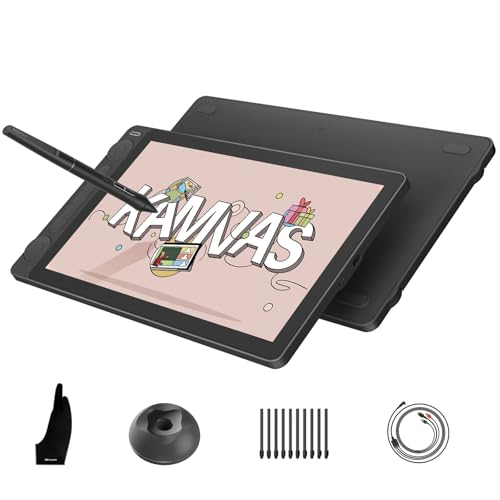
The HUION Kamvas 13 Gen 3 is a 13. 3-inch drawing tablet with a full-laminated screen and advanced anti-glare glass, designed specifically for creative professionals who want precise color and a natural drawing feel. Its high color accuracy and ultra-responsive PenTech 4.
0 stylus make it a reliable solution for artists who need their digital work to look exactly as intended, eliminating the guesswork and frustration of color inconsistency.
The Kamvas 13 Gen 3 feels smooth and intuitive, its paper-like surface and calibrated display give you the confidence to sketch, shade, and paint without distractions. The dual dials and customizable buttons streamline your workflow, helping you focus more on the creative process and less on technical adjustments.
- Strengths:
- Exceptional color accuracy: 99% sRGB and factory-calibrated
- Paper-texture glass minimizes glare and parallax
- PenTech 4.0 stylus with 16,384 levels of pressure sensitivity
- Dual dials for faster workflow adjustments
- Limitations:
- Requires connection to a computer or laptop (not standalone)
Is The Kamvas 13 Gen 3 Right For You?
If you’re a professional artist, designer, or illustrator who values reliable color and a realistic drawing surface, this tablet removes the uncertainty from your workflow. It’s an excellent fit for those who want a dedicated art display that feels like traditional media but delivers all the speed and control of digital tools.
If you need a standalone device, or you work mainly on the go, you might want to consider other options.
For optimal use, set up your workspace with good lighting to get the most from the anti-glare surface. You can trust that the Kamvas 13 Gen 3’s accuracy and build quality will let you focus on your art, not the hardware.
How To Approach Choosing A Drawing Tablet For Professionals
Start by thinking about how and where you work. Consider if you need a standalone device or if you’re comfortable being tethered to a computer. Decide if portability or screen size matters more for your workflow. Reflect on which features you’ll actually use day-to-day, rather than just the highest numbers.
Let your regular habits guide your choice, not just the specs.
Who May Want To Reconsider Or Common Pitfalls In Picking A Professional Drawing Tablet
- Expecting a drawing tablet to replace a full computer unless it’s a true standalone model.
- Choosing advanced features you won’t actually use, leading to wasted budget.
- Assuming all tablets are equally portable or easy to set up in any environment.
- Overlooking software compatibility with your preferred creative tools.
- Buying without considering long work sessions and the need for ergonomic support.
Frequently Asked Questions About The Best Drawing Tablet For Professionals
Is A Standalone Drawing Tablet Necessary For Professional Work?
Not always. Some professionals prefer tablets that connect to a computer for access to more powerful software. Standalone tablets are best for those who want mobility and basic app support.
How Important Is Pressure Sensitivity For Digital Artists?
Pressure sensitivity matters if your work relies on nuanced pen control. However, after a certain level, most artists won’t notice the difference in everyday use.
Should I Prioritize Screen Size Or Portability?
This depends on your workspace and travel needs. Larger screens offer more space but are heavier, while compact models are easier to carry but may feel cramped for detailed work.
Will Any Drawing Tablet Work With The Software I Already Use?
Not all tablets support every operating system or software out of the box. Always check compatibility with your main creative applications before buying.
Are Shortcut Keys And Dials Necessary For Professional Use?
Shortcut keys and dials speed up workflow for users who rely on them. If you prefer a keyboard or don’t use many shortcuts, these may not be essential for you.
Can A Beginner Use A Professional Drawing Tablet Effectively?
Beginners can use professional tablets, but the learning curve may be steep. Some features might go unused until you gain more experience.
What Should I Do If I Experience Hand Or Wrist Fatigue?
Consider models with ergonomic stands or invest in accessories that support a neutral hand position. Take regular breaks to reduce strain during long sessions.
Settling On The Right Professional Drawing Tablet For Your Needs
Take your time to weigh what truly matters in your creative process and daily work. There’s no single “best” choice, just the one that fits how you like to create and where you do your best work.
As you narrow your options, trust your own habits and priorities. The right drawing tablet should support your skills, not overwhelm or distract from them.