Genius is a brand of KYE Systems, and its best-known pen tablets, the G-Pen and MousePen lines, date from around 2009 to 2011. Our search of Amazon's US catalog in November 2026 returned no Genius drawing tablet, so the picks below are current alternatives from other brands.
Older Genius models show how far pens have moved. The G-Pen F610 listed 1,024 pressure levels, while the GAOMON S620 below lists 8,192. If you already own a Genius tablet, get drivers from the Genius website rather than a third-party driver site.
Based on published specs and retailer listings, not hands-on testing. Sources: Genius G-Pen F610 announcement, Genius G-Pen F509 announcement.

1. 12HD-A 11.6 inch pen display drawing tablet
- Brand: DAGROD
- Color: Preto
- Size: 12.48 x 7.83 x 0.04 in
Discover the Mesa Digitalizadora, a 12HD-A H-IPS LCD graphics drawing tablet monitor. Ideal for artists who value precision. Its 11.6-inch screen offers vibrant, clear visuals. The tablet supports tilt function for more dynamic drawing. Powered by USB, it ensures low energy consumption. Compatible with Windows OS for seamless integration.
Advantages
- Explore the benefits of the Mesa Digitalizadora 12HD-A Graphics Tablet Monitor.
- Enjoy vivid visuals with the H-IPS LCD display. Colors appear bright and clear. Your artwork comes to life.
- The 11.6-inch screen offers ample space for creativity. Draw comfortably. No need to zoom in often.
- Tilt function support enhances drawing precision. Mimics traditional drawing tools. Ideal for detailed work.
- Low power consumption saves energy. Powered by USB. Efficient and eco-friendly.
- Compatible with Windows OS for seamless integration. Easy setup. Start creating right away.
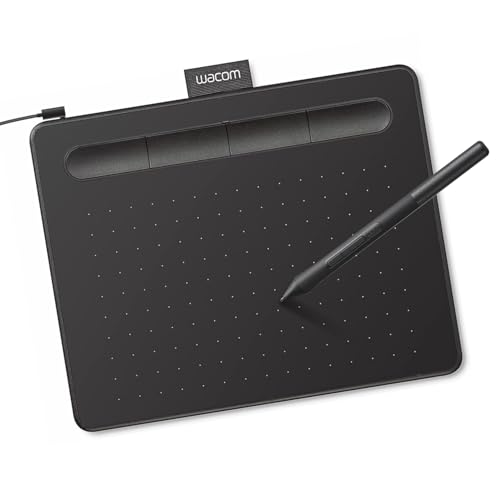
2. Wacom Intuos Small
- Brand: Wacom
- Color: PRETA
- Size: 7.87 x 6.3 x 0.35 in, 0.51 lb
Experience creativity with the Wacom CTL4100 Intuos Creative Pen Tablet. Its sleek black design looks great on any desk. Easy to use, it enhances your digital art projects. Perfect for beginners and pros alike. The pressure-sensitive pen allows precise strokes and smooth lines. Connects effortlessly to your computer via USB. Ideal for drawing, photo editing, and digital design.
Advantages
- Experience smoother digital drawing with Wacom CTL4100. Its responsive touch and precise pen make creative projects easy and fun. Ideal for artists, designers, and beginners alike.
- Compact design for easy portability. This tablet fits in backpacks or bags without hassle. Take creativity with you wherever you go. Perfect for travel and small workspaces.
- Customizable buttons boost efficiency. Set shortcuts for commonly used functions. Simplifies workflow and saves time. Ideal for busy digital artists.
- Natural pen feel enhances drawing experience. The pen mimics traditional tools, offering comfort and control. Great for sketching, illustrating, or photo editing.
- Wide software compatibility. Connects well with popular art programs. Ensures you can start creating right away. Suitable for various artistic needs.

3. Graphics Drawing Tablet
- Brand: UGEE
- Color: Preto
- Size: 14.09 x 8.27 x 0.31 in, 2.2 lb
Discover the UGEE M708, a large digital drawing tablet perfect for artists. Its generous size of 25.4 x 15.2 cm provides ample space to create. Equipped with 8 customizable shortcut keys, it enhances your workflow. The pen offers 8192 pressure levels for precise and smooth sketches. Ideal for digital artists seeking a reliable tool for their creative projects. Enjoy seamless drawing experiences on this user-friendly graphic tablet.
Advantages
- Versatile and Large Drawing Surface
- The UGEE M708 offers a generous space for creativity. Its size makes sketching and drawing more comfortable. Ideal for detailed artwork. Perfect for graphic design enthusiasts.
- High Pen Pressure Sensitivity
- Experience precision with 8192 levels of pen sensitivity. Capture every stroke with accuracy. Enjoy a smooth drawing experience. Great for both beginners and professionals.
- Customizable Shortcut Keys
- Eight shortcut keys enhance productivity. Quick access to essential tools. Simplifies workflow in graphic design. Personalize settings to fit your needs.
- User-Friendly Design
- Easy setup for all skill levels. Compatible with various software. Lightweight and portable. Perfect for home or office use.
- Affordable and Reliable
- Quality meets affordability in the UGEE M708. Durable construction ensures long-lasting use. A great investment for budding artists. Provides excellent value for money.

4. UGEE Drawing Tablet
- Brand: UGEE
- Color: Roxa
- Size: 12.5 x 9 x 0.5 in
Discover the UGEE Tablet, designed for digital artists seeking precision. Its generous 25 x 15 cm surface offers ample space to create. Equipped with 12 handy shortcut keys, it enhances workflow efficiency. Enjoy the battery-free stylus with 8192 pressure sensitivity. This ensures every stroke is captured with accuracy. The 60° tilt function adds flexibility for dynamic drawing. Compatible with PC, Mac, Windows, and Android. Available in a vibrant purple, it combines style with functionality.
Advantages
- Explore seamless creativity with the UGEE drawing tablet. This tablet offers incredible features and benefits for artists and designers.
- Experience smooth drawing with 8192 pressure sensitivity levels. Perfect for detailed artwork and precise design.
- The battery-free stylus ensures uninterrupted creativity. No charging required, just draw.
- 12 shortcut keys enhance workflow efficiency. Customize them to suit your design needs.
- Compatibility with PC, Mac, Windows, and Android. Versatile for various devices and platforms.
- 60° tilt function for dynamic stroke control. Create natural, varied lines effortlessly.

5. HUION Inspiroy Frego Medium Wireless Drawing Tablet 10x6.25 inch
- Brand: HUION
- Color: PRETO
Discover the HUION Inspiroy Frego Medium Wireless Drawing Tablet. A perfect companion for artists and designers. Enjoy wireless freedom with Bluetooth connectivity. Compatible with Windows, Mac, Android, and Linux. Ideal for digital art, photo editing, and teaching. Portable and sleek, it fits your creative lifestyle.
Advantages
- Effortless wireless connectivity enhances creative sessions. Bluetooth ensures seamless interaction.
- Compatible with multiple platforms. Works with Windows, Mac, Android, Linux.
- Compact design allows easy transport. Perfect for on-the-go creativity.
- Ideal for various tasks. Great for design, writing, photo editing, teaching.
- Large drawing area facilitates detailed work. Offers ample space for creativity.
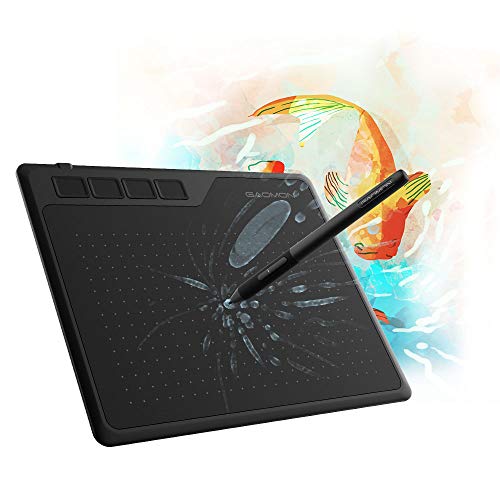
6. GAOMON S620 Graphics Drawing Tablet
- Brand: GAOMON
- Color: Preto
- Size: 4 x 6.5 x 0.04 in, 0.6 lb
Discover the GAOMON Mesa Digitalizadora Tablet S620, perfect for digital art and online teaching. This tablet offers a generous 15 x 10-inch working area. The passive pen with 8192 pressure levels enhances creativity and precision. Four express keys make drawing and navigating easy. Compatible with Mac, Windows, and Android systems. Ideal for artists and educators alike.
Advantages
- This graphic tablet boosts creativity with its 8192 pen sensitivity. Perfect for digital drawing and OSU gaming enthusiasts. Enhances teaching online with smooth, precise control. Compatible with Mac, Windows, and Android systems. Compact design with four express keys for efficiency.

7. UGEE Q8W Bluetooth Drawing Tablet
- Brand: UGEE
- Color: Tablet de escrita
- Size: 11.02 x 7.87 x 0.04 in, 0.75 lb
Discover the UGEE Q8W drawing tablet. It features Bluetooth 5.0 for seamless connectivity. Enjoy a large 20 cm active area for creative freedom. The pen offers 8192 levels of pressure sensitivity. No battery needed for uninterrupted drawing sessions. Perfect for artists seeking precision and ease.
Advantages
- Enjoy wireless freedom with Bluetooth 5.0 connectivity. No cords needed.
- Large 20 cm drawing area enhances creativity. More space for ideas.
- Experience precision with 8192 pen pressure levels. Draw with detail.
- Battery-free pen offers uninterrupted drawing sessions. No charging hassle.
- Convenient stand provides comfortable drawing angles. Reduces strain.

8. GAOMON M106K PRO Drawing Tablet, 10x6.25, 12 Keys with Tilt
- Brand: GAOMON
- Color: Preto
- Size: 14.13 x 9.45 x 0.04 in, 1.59 lb
Discover the GAOMON M106K PRO, a graphic tablet perfect for artists. It offers a spacious 10 x 6.25 inch drawing area. The tablet supports 8192 levels of pen pressure sensitivity. This makes drawing feel smooth and natural. Enjoy the convenience of a battery-free stylus. The 12 shortcut keys enhance productivity across Windows, Mac, and Android devices.
Advantages
- Natural Drawing Experience
- Enjoy smooth strokes with the battery-free stylus.
- Enhanced Productivity
- Twelve hotkeys simplify access to frequently used functions.
- High Sensitivity Levels
- 8192 pressure levels ensure precise control and detail.
- Cross-Platform Compatibility
- Works naturally with Windows, Mac, and Android devices.
- Spacious Work Area
- Large 10 x 6.25-inch surface for comfortable drawing.
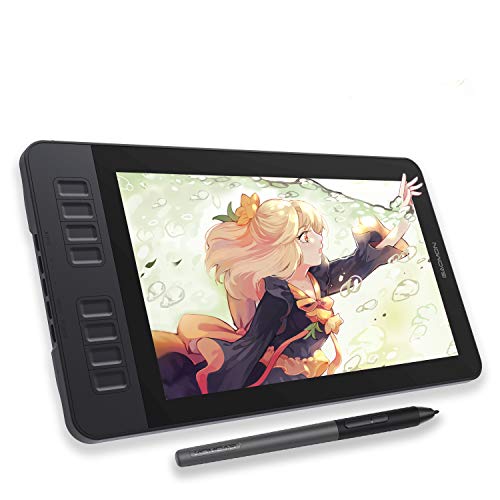
9. GAOMON PD1161 Drawing Tablet
- Brand: GAOMON
- Color: Preto
- Size: 14.2 x 7.9 x 0.1 in, 1.9 lb
Discover the Mesa Digitalizadora Gaomon PD1161, a fantastic tool for creativity. With its 11.6-inch screen, it offers a perfect size for both kids and adults. The 8192 pressure levels provide a smooth drawing experience, capturing every detail. The battery-free pen ensures you never have to worry about charging. Ideal for young artists exploring their imagination on a magical canvas.
Advantages
- Enjoy a smooth drawing experience with 8192 levels of pressure.
- Battery-free pen means no charging worries. Just draw.
- Compact 11.6″ size fits easily in your backpack.
- Perfect for kids. Encourages creativity with a magical touch.
- Clear display shows vibrant colors and fine details.

10. Ksequ LCD Writing Tablet
- Brand: Ksequ
- Color: Preto
- Size: 6.25 x 3.38 x 0.43 in, 0.12 lb
Discover endless creativity with the Ksequ Tablet de escrita LCD. Designed for both children and adults, this dual-screen tablet offers a fun and engaging way to draw or write. Portable and easy to use, it’s perfect for school, office, or home. The screens are easily erasable and reusable, allowing for countless doodles and notes. Compact sizes of 16.5 cm and 15 cm make it ideal for on-the-go convenience.
Advantages
- Perfect for kids and adults alike. Everyone can enjoy it.
- Dual-sided screen offers twice the writing and drawing space.
- Lightweight and portable design fits in any bag easily.
- Environmentally friendly. It’s reusable and saves paper.
- Easy to erase. Start fresh with a single button press.
Frequently Asked Questions
How Do I Connect a Drawing Tablet To My Computer?
Simply plug the tablet’s USB cable into your computer. Install any drivers if prompted. You’re ready to draw!
What Software Works With These Drawing Tablets?
Most work with popular software such as Adobe Photoshop, CorelDRAW and GIMP. Check the maker's compatibility list for your model.
Can I Use These Tablets For Graphic Design?
Yes, it’s perfect for graphic design tasks. Its precision helps with creating detailed designs. Ideal for creative projects.
How Do I Troubleshoot a Drawing Tablet?
First, check the cable connection. Ensure drivers are up-to-date. Restart your computer. Contact support if issues persist.
Buying Guide: Choosing an Alternative to a Genius Tablet
1. Understand your needs
Identify your primary use for the tablet. Is it sketching, designing, or editing? different tasks may require different features. Consider what software you plan to use. This impacts compatibility and performance.
2. Consider the tablet size
Choose a size that fits your workspace. A large tablet offers more drawing area. Smaller tablets are more portable. Think about your comfort and space limitations.
3. Check the pressure sensitivity
Higher pressure sensitivity provides better control. It helps in creating detailed artwork. Look for a tablet with good pressure levels. More pressure levels mean finer control.
4. Explore connectivity options
Decide between wired or wireless models. Wireless offers freedom from cables. Wired ensures a stable connection. Consider your setup and preferences.
5. Evaluate the stylus features
Choose a stylus with good ergonomics. Pen tilt support enhances realism. Check for battery-free or rechargeable pens. Comfort and ease of use are key.
6. Look at display quality
Inspect the display resolution. Higher resolutions offer clearer visuals. Check color accuracy for design work. A good display enhances your experience.
7. Assess software compatibility
Ensure compatibility with your software. Some tablets work better with certain programs. Verify operating system requirements. Compatibility ensures smooth operation.
8. Set your budget
Decide on a budget before shopping. More features often mean higher costs. Look for deals or bundles. Balance cost with required features.
9. Read reviews and testimonials
Check customer reviews for real-world insights. Reviews highlight pros and cons. Look for feedback on durability and performance. They help inform your decision.
10. Test before buying
Try the tablet in-store if possible. Test the feel and responsiveness. Ensure the tablet meets your comfort needs. First-hand experience can be invaluable.
Plus, its compatibility with various software is a big advantage. It’s designed to meet the needs of digital artists. The lightweight design makes it portable and easy to carry. Artists can work anywhere, anytime. This tablet provides an excellent digital drawing experience.