Switching from a mouse to a drawing tablet can feel like a huge step, especially if you want to use Photoshop. Maybe you’re tired of clumsy lines or want more control for your art or photo edits. But with so many options, picking the right drawing tablet gets confusing fast.
Some tablets have a screen, others don’t. Sizes and features vary. Some models focus on portability, while others give you more space to work. There’s a range in price, and what you pay often trades off with how many shortcuts, the pen feel, or how easy it is to set up.
If you’re new, even basic choices like pen pressure or shortcut keys may be unclear. If you’ve used tablets before, you might want more precise color or comfort for long sessions. There’s no single right answer.
This article will help you find the drawing tablet that matches how you use Photoshop and what matters most to you.
Below you’ll see several tablets compared side by side. Each meets different needs, some work best for quick sketches, others for detailed editing, and some for those on a tighter budget. Take your time and see which one fits your way of working.
Xp-pen Deco 01 V3 Drawing Tablet
As one of the Best Drawing Tablet for Photoshop, this tablet is perfect for beginners and hobbyists looking for a reliable, easy-to-use digital art solution.

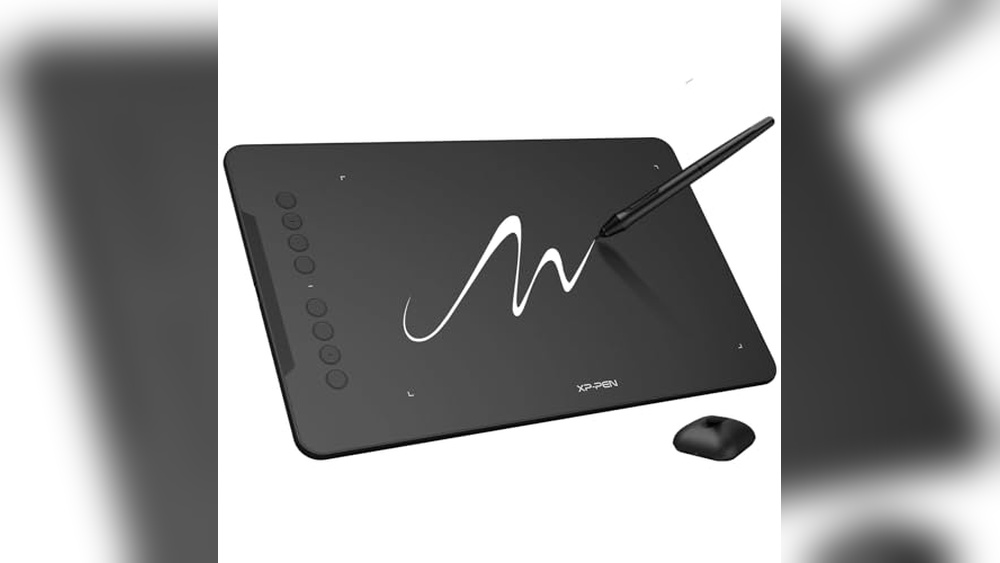
The XP-Pen Deco 01 V3 Drawing Tablet is a large, lightweight graphics tablet designed to make digital art accessible and enjoyable. Its standout feature, 16,384 pressure levels, means your brush strokes feel precise and natural, which is a real game changer for anyone who wants their Photoshop work to look and feel like real drawing.
In practice, the Deco 01 V3 feels smooth and responsive, with no need for batteries or charging, so you can jump straight into creative work without hassle. The eight customizable hotkeys are easy to reach, making common Photoshop tasks quick and intuitive, whether you’re left- or right-handed.
- Strengths:
- Exceptionally high pressure sensitivity for expressive drawing
- Large 10×6.25 inch workspace gives you room to create
- Works with Chrome, PC, Mac, and Android (including smartphones)
- No battery or charging needed for the stylus
- Easy USB-C connectivity and beginner-friendly setup
- Limitations:
- No built-in screen, so you must use your computer/monitor
- Some advanced users may want more premium build materials
| Pressure Levels | 16,384 |
| Active Area | 10 x 6.25 inches |
| Hotkeys | 8 customizable |
| Compatibility | Windows, Mac, Android, Chrome |
| Stylus Type | Battery-free, tilt support |
Who Will Love This Tablet?
If you’re just starting with digital art or want a reliable, frustration-free tablet for Photoshop, the XP-Pen Deco 01 V3 is a solid choice. It removes the stress of complicated setup and lets you focus on drawing, not on charging or configuring your tools.
For those who want a portable, large workspace without spending a fortune, this tablet hits the sweet spot.
Professionals who need a built-in screen or more advanced features may prefer a higher-end model, but for beginners and casual artists, this tablet is easy to recommend. My tip: set up your most-used shortcuts on the hotkeys early on, it’ll save you time and make your workflow smoother. If you’re worried about compatibility or learning curves, rest assured: the Deco 01 V3 is designed to make digital art approachable and enjoyable from day one.
Wacom Intuos Small Drawing Tablet
The Best Drawing Tablet for Photoshop for artists, students, or hobbyists who want reliable pen control and a natural drawing feel.

The Wacom Intuos Small Drawing Tablet is a compact, lightweight graphics tablet that brings a true pen-on-paper feel to your digital art and photo editing workflow. Its battery-free EMR technology means you get responsive, precise pen control without worrying about charging, which is ideal for artists looking for an intuitive way to sketch, retouch, or paint in Photoshop.
The tablet is comfortable to set up and feels instantly familiar, even if you’re new to digital drawing. The four customizable ExpressKeys add convenience by letting you create shortcuts for your most-used Photoshop tools, so you spend less time hunting through menus and more time creating.
The included training and software access also help you get started quickly and confidently.
- What stands out: Industry-leading pen technology offers accuracy and a natural feel.
- Bonus: Compatible with Chromebook, Mac, Android, and Windows for maximum flexibility.
- Consider: The small active area is great for portability, but may feel limited for large-format artwork.
Is This The Right Photoshop Tablet For You?
If you want a simple, trusted tablet for Photoshop and digital art, the Wacom Intuos Small is a smart place to start, especially if you’re tight on desk space or need something lightweight for travel. It’s great for students, hobbyists, and even professionals who value Wacom’s reliability but don’t need a large drawing surface.
On the other hand, if you often create oversized illustrations or need a built-in screen, you might prefer a larger or display-based model. But for everyday edits, quick sketches, and precise photo retouching, this tablet removes the guesswork and lets you focus on your creativity. My tip: Take a few minutes to customize the ExpressKeys for your favorite Photoshop shortcuts, it’s a small step that will save you hours in the long run.
Xp-pen Artist 13.3 Pro Drawing Tablet
The Best Drawing Tablet for Photoshop users who want a responsive display and customizable controls for streamlined creative work.

The XP-Pen Artist 13. 3 Pro Drawing Tablet is a fully-laminated graphics monitor designed for digital artists who want the tactile experience of drawing directly on the screen. Its 13. 3-inch display delivers vivid colors and sharp details, while the tilt function allows for natural shading and brush control, making it particularly useful for Photoshop work where precision and nuance matter.
The inclusion of 8 customizable shortcut keys and a red dial streamlines your workflow, letting you focus more on your art and less on menu navigation.
This tablet provides a comfortable and intuitive drawing experience. The customizable keys mean you can tailor shortcuts to your most-used tools, which saves time and reduces repetitive strain. The fully-laminated screen minimizes parallax, giving you confidence that your lines appear exactly where you intend.
It’s a tool that helps you stay in your creative flow without technical distractions.
- Strengths:
- Fully-laminated 13.3″ FHD display with vivid color accuracy (123% sRGB)
- Supports up to 60° tilt for natural shading in Photoshop
- 8 shortcut keys and a red dial for efficient workflow
- Compatible with Windows, Mac, Chrome OS, and Linux
- Limitations:
- Requires connection to a computer (not standalone)
- May feel small for users preferring larger drawing areas
Is This The Right Tablet For You?
If you need a responsive, accurate tablet for detailed Photoshop work and want the benefit of programmable keys, the XP-Pen Artist 13. 3 Pro is a solid pick, especially if space is at a premium on your desk. It’s ideal for artists, illustrators, and students who want a dependable drawing companion that works across different operating systems.
If you need a completely standalone device or prefer a much larger canvas, you might want to look elsewhere. For everyone else, this tablet removes guesswork and gives you control, so you can focus on your art, not your tools.
Start by customizing the shortcut keys to your favorite Photoshop actions for an even smoother workflow, you’ll find the setup process straightforward and reassuringly simple.
Huion Inspiroy H640p Drawing Tablet
The Best Drawing Tablet for Photoshop for digital artists, students, and designers seeking a compact, reliable tool for creative work.

The HUION Inspiroy H640P is a slim, portable drawing tablet designed for artists and creators who need a reliable companion for Photoshop and other creative software. Its 6×4 inch active area and battery-free stylus make it perfect for sketching, editing, and digital design, especially when desk space is tight.
One standout feature is the six customizable hot keys, allowing you to speed up your workflow by assigning shortcuts you use most.
Using this tablet feels surprisingly natural, thanks to the stylus’s 8192 levels of pressure sensitivity and comfortable grip. Whether you’re retouching photos or drawing on the go, the compact build slips easily into a bag and works seamlessly across Mac, Windows, Linux, and Android devices.
The H640P also doubles as an intuitive mouse replacement, helping reduce wrist strain during long sessions.
- Strengths:
- Super portable and lightweight
- Battery-free stylus with high pressure sensitivity
- Customizable hot keys for workflow efficiency
- Wide compatibility with computers and Android devices
- Limitations:
- Not compatible with iOS devices
- Small drawing area may not suit users needing large canvases
Is This The Right Tablet For You?
If you want a dependable, affordable drawing tablet for Photoshop that doesn’t take up much space, the HUION Inspiroy H640P is a smart choice. It’s especially useful for students, hobbyists, or anyone who works between different locations or devices. However, if you need a tablet for large, sweeping illustrations or work exclusively on iPads, you’ll want to look elsewhere.
This tablet takes the stress out of setup and compatibility worries, letting you focus on your artwork. For best results, take a few minutes to customize the hot keys for your favorite Photoshop shortcuts, it makes a real difference in your workflow.
You can feel confident that, despite its size, the H640P delivers a solid, natural drawing experience wherever you use it.
Huion Kamvas 13 Drawing Tablet
As one of the Best Drawing Tablet for Photoshop, this device is ideal for digital artists, illustrators, and designers who want precise color and pen performance.

The Huion Kamvas 13 (Gen 3) is a 13. 3-inch drawing tablet with a full-laminated screen that must be connected to your computer or compatible Android device. Its anti-sparkle Canvas Glass 2. 0 helps reduce glare and eye strain, making it easier to work on detailed projects for hours, an important benefit for Photoshop users who demand both comfort and accuracy.
In practice, the advanced PenTech 4. 0 stylus delivers exceptionally natural strokes, thanks to 16,384 levels of pressure sensitivity and ultra-low initial activation force. The surface feels smooth and responsive, and color accuracy is reliable out of the box, so you spend less time fiddling with calibration and more time creating.
- Strengths:
- Vivid, accurate 99% sRGB color for true-to-life Photoshop work
- Minimal parallax and glare for less eye fatigue
- Ultra-sensitive pen with three customizable side buttons
- Works with PC, Mac, and Android (when supported)
- Limitations:
- Requires a computer, cannot be used standalone
- Physical buttons are limited compared to larger models
Is This The Right Tablet For You?
If you’re a Photoshop user looking for an affordable, compact drawing tablet that nails color fidelity and pen precision, the Huion Kamvas 13 (Gen 3) is a solid choice. It’s especially well-suited for students, hobbyists, and professionals who want a reliable tool without the bulk or price of larger displays.
However, if you need a standalone device or prefer more shortcut buttons, you may want to explore other options.
This tablet removes the guesswork from color matching and pen response, so you can focus on your creative work. To get the most out of it, set aside a few minutes to calibrate your screen using the included factory report.
Rest assured, the Kamvas 13 is built to handle long sessions and demanding edits with ease.
Gaomon M10k Large Drawing Tablet
As the Best Drawing Tablet for Photoshop, this device is ideal for digital artists, designers, and editors who need precision and customization in their creative workflow.

The GAOMON M10K Drawing Tablet offers a spacious 10×6 inch working area and a natural pen experience with 8192 levels of pressure sensitivity. Its battery-free stylus and customizable shortcut keys make it an excellent choice for professionals and hobbyists who need reliable performance and smooth workflow integration with Photoshop and other creative software.
Using the M10K feels intuitive, with the touch ring providing quick access to zoom and brush adjustments. The papery texture surface gives a tactile feel, which helps simulate traditional drawing. Setting up the tablet is straightforward, and the compatibility across Windows, Mac, and Android means you can switch devices without hassle.
- Strengths:
- Large drawing surface for comfortable, detailed work
- Highly responsive stylus with no charging required
- Customizable keys and touch ring for efficient workflow
- Wide compatibility with Photoshop and other major programs
- Supports both right and left-handed users
- Limitations:
- No built-in screen, requires connection to a computer or compatible device
- Not ideal for ultra-portable use due to its size
Who Will Benefit Most
If you work extensively in Photoshop or similar art programs and appreciate customizable controls, this tablet can streamline your creative process and minimize interruptions. It’s especially suited for illustrators, designers, and anyone who values a large, comfortable workspace and precise pen input.
On the other hand, if you prefer a tablet with a built-in display or need something ultra-light for travel, you might want to consider alternatives. The GAOMON M10K shines in studio settings where space and reliability matter more than portability.
Tip: Spend a few minutes customizing your shortcut keys and touch ring for the tools you use most, this small setup step can save you hours in the long run. Once you get familiar with the tablet’s features, you’ll find it delivers consistent results and makes digital drawing feel natural and effortless.
Huion Inspiroy H1060p Drawing Tablet
The Best Drawing Tablet for Photoshop for digital artists, students, or professionals who need a reliable and customizable device for creative work.

The HUION Inspiroy H1060P is a large, slim graphics tablet designed to give you a comfortable and efficient drawing experience. Its 10 x 6. 25 inch working area and battery-free stylus with tilt support make it a strong choice for anyone looking to upgrade their digital art setup, especially if you want customizable shortcuts and a responsive drawing surface.
In day-to-day use, the tablet feels intuitive and smooth, letting you focus on your creative process without worrying about running out of battery or being limited by space. The customizable keys are a real time-saver in Photoshop, and the stylus’s natural pressure sensitivity means your lines and brushstrokes feel authentic and accurate.
- Why it stands out:
- Large work area for comfortable drawing sessions
- Battery-free stylus with ±60° tilt support for natural hand movement
- Customizable hot keys for efficient workflow in Photoshop
- Compatible with Windows, Mac, Android, and Linux (Xorg only)
- Consider before buying:
- Not compatible with iPhone or iPad
- Requires Xorg display server on Linux (not Wayland)
- Some Samsung Galaxy S devices may not show the cursor
Is This The Right Tablet For You?
If you want a no-fuss drawing tablet for Photoshop that works well across multiple operating systems and offers plenty of customizability, the HUION Inspiroy H1060P is a reliable pick. Students, hobbyists, and pros alike will appreciate its responsive stylus and thoughtful shortcut layout.
However, if your main workflow is on an iPad or you need full Linux Wayland support, you’ll want to skip this model. For everyone else, setting up the drivers and configuring your favorite shortcuts is straightforward, take a few minutes to personalize your hot keys for the tools you use most.
Once you do, you’ll find your creative sessions feel much smoother and less interrupted.
Huion Inspiroy H950p Drawing Tablet
The Best Drawing Tablet for Photoshop for digital artists, illustrators, and designers seeking an affordable, portable option.

The HUION Inspiroy H950P is a compact, medium-sized drawing tablet designed to give Photoshop users a natural pen experience without the hassle of charging. With its battery-free stylus and 8192 levels of pressure sensitivity, it delivers precision and control for detailed artwork and photo editing.
Customizable hot keys streamline your workflow, making frequent actions faster and easier.
The tablet feels intuitive and responsive, letting you focus on creativity instead of fiddling with settings. Its lightweight build and slim profile mean it’s easy to take from your desk to a coffee shop or classroom. Compatibility with Windows, Mac, Linux, and Android ensures you can use it wherever inspiration strikes.
- Strengths:
- 8192-level pen pressure for nuanced brushwork
- Battery-free stylus, no charging required
- Eight customizable hot keys for faster shortcuts
- Works with most operating systems and devices
- Portable and slim for travel or limited desk space
- Limitations:
- No screen, requires connection to a computer or mobile device
- Medium size may feel small for users used to larger tablets
| Feature | HUION Inspiroy H950P |
|---|---|
| Active Area | 8 x 5 inches |
| Pen Pressure | 8192 levels |
| Hot Keys | 8, customizable |
| Compatibility | Mac, Windows, Linux, Android |
| Weight | 1.76 lbs (tablet) |
Is This The Right Tablet For You?
If you’re looking for an affordable, reliable drawing tablet for Photoshop and other creative work, the HUION Inspiroy H950P is a solid choice. It suits students, hobbyists, and professionals who value portability and compatibility without sacrificing pen performance.
Those who require a built-in screen or a larger workspace might want to consider other options. For everyone else, the H950P removes the stress of battery management and delivers a straightforward, dependable drawing experience. Try mapping your most-used Photoshop shortcuts to the hot keys for maximum efficiency, and rest assured that setup is quick and frustration-free.
Huion Inspiroy 2 Large Drawing Tablet
As the Best Drawing Tablet for Photoshop, this is perfect for digital artists, graphic designers, and illustrators seeking precision and custom shortcuts.

The HUION Inspiroy 2 Large Drawing Tablet is a 10×6 inch professional art tablet designed to deliver accuracy and fluidity for Photoshop users. With its advanced PenTech 3. 0 technology, it eliminates lag and wobble, providing a natural pen-on-paper feel that lets you focus on your creative process without technical distractions.
The programmable scroll wheel and 24 customizable shortcut keys save a ton of time, especially when switching between tools or adjusting brush settings. The ergonomic stylus ensures comfort during long sessions, so you can work for hours with less fatigue and more confidence in your workflow.
- Why Artists Like It:
- Lag-free, precise pen performance for detailed work
- Customizable shortcuts for Photoshop efficiency
- Comfortable, lightweight stylus design
- Works across Mac, PC, Linux, and Android devices
- Limitations:
- No built-in display, requires connection to a computer or compatible device
- Large size may not suit small workspaces
Should You Choose The Inspiroy 2?
If you want a drawing tablet that elevates your Photoshop work with speed and accuracy, this HUION model is a solid bet. Its advanced pen tech and customizable controls cut down on repetitive actions and let you personalize your setup, which is a major stress-reliever for both beginners and pros.
However, if you’re looking for a standalone tablet with a built-in screen or have very limited desk space, you might want to consider other options. For most digital artists, though, the Inspiroy 2 brings professional features without unnecessary complexity. Take a few minutes to set up your favorite shortcuts, and you’ll feel right at home from the start.
Xp-pen Artist 12 3rd Gen Drawing Tablet
The Best Drawing Tablet for Photoshop for digital artists and students who want a portable, color-accurate device that works seamlessly across platforms.

The XP-Pen Artist 12 3rd Gen is a compact drawing tablet with a 11. 9″ screen, designed to deliver professional pen performance and superior color accuracy for digital artists and illustrators. With its portable build and dual X-Dial wheels, it tackles the common frustrations of cramped workspaces and slow workflow adjustments, making it easy to sketch, paint, or retouch on the go.
Using this tablet feels almost like drawing on paper, thanks to the AG etched glass and full lamination technology that minimize glare and parallax. The customizable keys and dial wheels are a true timesaver, letting you focus more on your art and less on repetitive shortcuts, whether you’re sketching in a café or switching between projects in Photoshop.
- Ultra-portable: Just 1.58 lbs and slim, fits easily in a backpack
- High color accuracy: 99% sRGB, ΔE<1.5, factory calibrated for Photoshop work
- Universal compatibility: Works with Windows, macOS, Android, ChromeOS, Linux
- X4 Pen: 16,384 pressure levels, 60° tilt, magnetic attach, 10 spare nibs
- Efficient workflow: Dual dial wheels and 8 customizable keys
Who Will Appreciate This Tablet Most?
If you’re a digital artist, student, or designer who values portability without sacrificing pen precision or display quality, the XP-Pen Artist 12 3rd Gen is a smart pick. It’s especially helpful for those who want a reliable tablet for Photoshop but need to move between classrooms, studios, and home.
Those who prefer a larger workspace or need a standalone device (not a display tablet that connects to a computer) might want to look elsewhere. But for anyone overwhelmed by cluttered setups or slow workflows, this tablet clears up desk space and streamlines creative work. A practical tip: take advantage of the customizable keys to set your favorite Photoshop tools for even faster access. You can trust it to work smoothly across different systems without extra hassle.
How To Approach Picking The Right Drawing Tablet
Consider how you prefer to work, on a screen or on a blank tablet. Think about whether portability, screen quality, or shortcut customization matters most for your process. Some tablets need a computer to function, while others work with phones or on their own.
What feels natural in your hand is just as important as features on the spec sheet. Matching your needs with your comfort level makes for a better long-term fit.
Common Pitfalls And Who Should Look Elsewhere
- If you expect a tablet to replace your computer, check compatibility, most require a laptop or desktop.
- Those wanting a “plug and play” experience may find setup and driver installation more involved than expected.
- People sensitive to screen reflections or parallax should be careful, some models are better than others at minimizing these.
- Tablets without screens can feel unnatural for those used to drawing directly on paper.
- If you rarely do digital art or photo editing, a drawing tablet may be more tool than you need.
Faqs: Choosing The Best Drawing Tablet For Photoshop And Digital Art
Do I Need A Tablet With A Screen For Photoshop?
No, but many artists prefer it for direct visual feedback. Screenless tablets are still widely used and can be more affordable.
Will These Tablets Work With My Mac Or Chromebook?
Most modern tablets offer cross-platform compatibility, but always check for confirmed support with your operating system. Some advanced features may require additional driver setup.
How Important Is Pen Pressure Sensitivity?
Higher pressure levels allow for finer control, but most beginners won’t notice a difference above 8,192 levels. For professionals, it matters more.
Are Drawing Tablets Good For Beginners?
Yes, but the learning curve varies. Some find it takes time to adapt, especially to non-screen models.
Can I Use A Drawing Tablet For Tasks Besides Art?
Yes, many use them for note-taking, document signing, and as a mouse alternative. The experience can be more comfortable than a mouse for long sessions.
What’s The Main Regret Buyers Have?
Many wish they had chosen a size or model better suited to their workspace or drawing style. Rushing the decision can lead to frustration.
Is There A “best” Tablet For Photoshop?
No single model fits everyone. The best choice depends on your workflow, comfort, and budget.
Settling On Your Drawing Tablet Choice
Finding a drawing tablet that matches your habits and work style is more important than chasing the highest specs. Consider how you’ll actually use the device day-to-day and let that guide your decision.
Trust your sense of what feels comfortable and fits your creative process. The right tablet is the one that quietly supports your work, not distracts from it.