Kids love to draw. Parents want to encourage creativity, but picking the right tool is not so simple.
There are many types of drawing tablets for kids. Some are just for doodling. Others offer real digital art features. The choices can feel overwhelming. Prices range from budget-friendly boards to advanced tablets with screens. Some need a computer to work.
Others work by themselves. It can be hard to guess what a child will actually use or enjoy. Features that sound great may not matter to your kid, or might make things more complicated.
This guide will help you sort through the options and find what fits your situation best.
Below, you’ll see a range of drawing tablets for kids. They cover basic writing pads, standalone digital art tablets, and those that connect to a computer. Each has strengths and trade-offs, so you can match your choice to your child’s age, interest, and how you want them to use it.
Picassotab A10 Standalone Drawing Tablet
The Best Drawing Tablet for Kids, ideal for young artists and students who want a portable, easy-to-use device without needing a computer.

The Simbans PicassoTab A10 is a compact, standalone drawing tablet designed so kids and beginners can start creating without connecting to a computer. Its pre-installed Pro drawing apps and tutorials make it a stress-free way for children to explore digital art on a 10-inch HD display, with everything they need right out of the box.
The lightweight design means children can easily carry it from room to room or pack it for travel. The included stylus feels natural, and the anti-glare screen helps reduce eye strain, so kids can draw comfortably for longer sessions.
Setup is minimal: turn it on and start drawing.
- What stands out:
- Does not need a computer, fully portable
- Lifetime access to top drawing apps (no subscriptions)
- Step-by-step tutorials included for beginners
- Complete starter kit with stylus, glove, and case
- Ample storage for art projects (128GB, expandable)
- Potential limitations:
- 10-inch screen may feel small for advanced artists
- Android-based, so iPad-specific apps are not available
Is The Picassotab A10 Right For Your Young Artist?
This tablet is a smart choice for parents who want a hassle-free digital art solution for their kids or for students who prefer not to fuss with extra cables or computers. If your child enjoys drawing, animation, or simply taking creative notes, this tablet removes the technical barriers and lets them focus on learning and having fun.
Older teens or aspiring professionals who need a larger canvas or specific software may want to look elsewhere, but for most children and beginners, the PicassoTab A10 delivers everything needed to start and grow artistic skills. Give your child a comfortable grip stylus and reassure them: there’s no wrong way to begin, just explore, experiment, and enjoy the process.
Callsky-kids 12-inch Drawing Tablet
Best Drawing Tablet for Kids who want a hassle-free, standalone device perfect for beginners, young artists, and students.
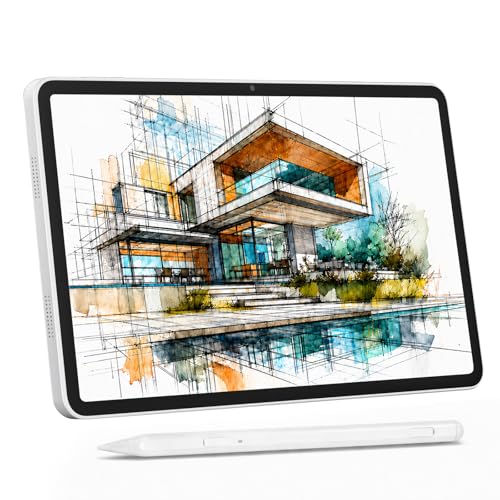
This standalone drawing tablet from Callsky-Kids is designed to make digital art accessible for kids and beginners, no computer or complicated setup required. The 12-inch screen is vibrant and spacious, and the included stylus with 4096 pressure levels means every sketch and doodle feels natural.
If you’re tired of cords, compatibility issues, or needing extra devices, this tablet solves that problem by being ready right out of the box.
Using it feels intuitive and comfortable, with the anti-glare screen reducing eye strain even during longer sessions. Kids can move from kitchen table to classroom or café with ease, and parents will appreciate the device’s reliability and simplicity. It’s a stress-free way to encourage creativity, just turn it on and start drawing.
- Strengths:
- Standalone operation, no computer needed
- Natural stylus with high pressure sensitivity
- Large, anti-glare, full-laminated display
- Runs Android 15 for app flexibility
- Plenty of storage for art projects (256GB, expandable)
- Lightweight and portable for easy travel
- Limitations:
- Not ideal for advanced professional artists needing desktop-level software
- Blue color may not suit all tastes
Who Will Benefit Most?
If you’re a parent seeking a worry-free, all-in-one drawing tablet for your child, this model takes away the stress of technical setup and keeps creative focus front and center. Beginners and students will love its simplicity, portability, and compatibility with popular drawing apps.
If you want a device that just works, no extra cables, drivers, or confusing menus, this is a great pick.
However, if you need advanced desktop art software or a highly customizable professional workflow, you might want to look elsewhere. For most families, though, this tablet is a calm, reliable starting point for digital art. A practical tip: keep the stylus attached magnetically when not in use, so it’s always easy to find. And rest assured, the anti-glare screen means your child can draw comfortably wherever inspiration strikes.
Wacom Intuos Small Drawing Tablet
The Best Drawing Tablet for Kids, ideal for young artists who want a simple, reliable entry into digital creativity at home or school.

The Wacom Intuos Small Drawing Tablet is a lightweight graphics tablet designed for kids and beginners looking to start drawing digitally. With its battery-free pen technology, it delivers a true pen-on-paper feel that helps young users focus on creativity instead of worrying about charging devices or complicated setups.
Using this tablet feels intuitive, even for kids who have never tried digital drawing before. Its compact size fits comfortably on any desk, and setup is straightforward, just plug in and start sketching. Parents can feel confident knowing their child can use it across Chromebook, Mac, Android, and Windows devices, and the included software and training make it easy to get started.
- Strengths:
- Pen is battery-free and always ready
- Works with all major creative software
- Includes helpful software and training for new users
- Trusted brand with decades of experience
- Compact and lightweight for small hands
- Limitations:
- No built-in screen, drawing is done while watching your computer
- Wired connection only, not wireless
| Feature | Kid-Friendly? |
|---|---|
| Battery-free pen | Yes, no charging required |
| Customizable ExpressKeys | Yes, easy shortcuts |
| Included training & software | Yes, guided learning |
Who Should Consider The Wacom Intuos Small?
This tablet is a smart choice for kids, teens, and families who want a reliable entry-level device for digital art, homework, and creative projects. If your child likes to draw and you want something simple, sturdy, and backed by a trusted brand, it removes the stress of compatibility and setup.
However, if your child prefers to draw directly on a screen, or needs a wireless device, this may not fit those needs. For most young artists, the pen’s natural feel and the included creative resources are reassuring and make the learning process much easier.
Tip: Take advantage of the included online training, it helps kids quickly learn digital drawing basics and builds their confidence step by step.
Tekfun 10-inch Kids Lcd Drawing Pad
Best Drawing Tablet for Kids looking for a mess-free, travel-ready way to doodle and create at home or on the go.

The TEKFUN 10-inch LCD Writing Tablet is a lightweight digital doodle board for kids that provides a colorful, eye-friendly screen for drawing, writing, and imaginative play. It’s designed to eliminate the mess of traditional coloring while giving children a reusable and portable way to be creative, perfect for families who want to avoid paper waste and crayon stains.
Using the pressure-sensitive surface is simple: kids can draw with the included stylus or any hard object, and clear the screen instantly with a single button press. The built-in key lock prevents accidental erasing, making it reliable for young users and giving parents one less thing to worry about during travel or daily use.
- Strengths:
- 10-inch screen offers plenty of space for drawing
- Ultra-lightweight (150g), easy to carry for travel
- Screen is eye-protective and mess-free
- One-click erase and screen lock for ease and security
- Durable, waterproof, and anti-fall for rough handling
- Considerations:
- Does not save drawings (unless photographed)
- No advanced digital features (no Bluetooth or app integration)
Is This The Right Drawing Tablet For Your Child?
If you want a simple, durable, and travel-ready drawing pad that doesn’t require charging or make a mess, the TEKFUN LCD Writing Tablet is a smart choice, especially for younger kids ages 3 to 8. It’s ideal for car rides, plane trips, or keeping children occupied at restaurants, with no fear of lost markers or ink on clothes.
Families looking for a device with digital storage or connectivity might want something more advanced, but for pure doodling fun and peace of mind, this tablet keeps things easy. My tip: remind kids to use the lock switch if they want to keep their creations until you can snap a quick photo. Overall, it’s a stress-free way to encourage creativity wherever you go.
Xppen Magic Drawing Pad 12.2″
The Best Drawing Tablet for Kids who want a creative, computer-free tool for digital art and doodling at home or on the go.

The XPPen Magic Drawing Pad 12. 2″ is a standalone digital drawing tablet designed for kids and young artists, offering a computer-free experience with a paper-like screen and a super-precise 16K pressure stylus. It solves the hassle of connecting to a computer or worrying about complicated setups, making it easy for children to dive straight into creative work.
Everyday use feels intuitive: the tablet is lightweight, easy on the eyes thanks to its TÜV Rheinland certified screen, and runs Android 14 for access to favorite drawing apps. Kids will appreciate the instant-on drawing, while parents can trust the durable design and generous storage for endless masterpieces.
- Truly standalone, no PC or phone needed
- Industry-leading 16,384 pressure levels for expressive lines
- Packs 8GB RAM and 256GB storage, plus microSD expandability
- Paper-like, low-strain screen with eye comfort enhancements
- Android 14, Google Play access, and bonus drawing app trials
Thoughtful Choice For Creative Kids
This tablet is ideal for kids, tweens, and young teens who love to draw and want a portable, all-in-one solution. If your child prefers simple pen-and-paper doodling or doesn’t need digital features, it may be more than necessary, but for those eager to explore digital art, it removes the stress of complicated tech.
Parents can feel reassured about eye safety and ease of use. Tip: Set up parental controls in the Android settings for a worry-free creative environment. The XPPen Magic Drawing Pad 12.2″ gives kids the freedom to create anywhere, without needing to borrow your computer.
Xp-pen Artist 13.3 Pro Drawing Tablet
The Best Drawing Tablet for Kids who want a professional art experience with user-friendly features and room to grow.

The XP-Pen Artist 13. 3 Pro is a full-featured drawing tablet with a screen, designed to connect to a computer for a seamless digital art experience. Its laminated 13. 3-inch display offers impressive color accuracy (123% sRGB), making it a solid choice for young artists who want to see their creations in vivid detail and work with the same kind of tool that professionals use.
The adjustable stand and 8 shortcut keys help kids stay comfortable and focused, while the tilt support pen gives a natural feel, much like drawing on paper. Parents and teachers can feel confident that this tablet will grow with the child, offering creative flexibility and compatibility with major art software as their skills develop.
- Strengths:
- Exceptional screen quality for detailed, colorful artwork
- Customizable shortcut keys and a handy red dial for easier navigation
- Compatible with Windows, Mac, Chrome OS, and Linux
- Works with all major creative programs for painting, drawing, and design
- Limitations:
- Requires connection to a computer; not a standalone tablet
- May be best for older kids ready for more advanced tools
Who Will Love The Xp-pen Artist 13.3 Pro?
This drawing tablet is a great match for kids who are passionate about digital art and ready to explore advanced features, especially those who use a computer for creative projects. If your child is looking for a device that feels like a “real” artist’s tool and you want something that will support their growth for years, this is a solid pick.
Families seeking a standalone tablet or a plug-and-play device for very young children may want to look for simpler options. For everyone else, the XP-Pen Artist 13.3 Pro removes the guesswork of choosing between quality and usability. Tip: Take a few minutes to set up the shortcuts together, so your child can jump right into drawing with confidence.
Huion Inspiroy H640p Kids Drawing Tablet
The Best Drawing Tablet for Kids who want a reliable, simple, and portable solution for digital art, homework, or creative play.

The HUION Inspiroy H640P is a compact drawing tablet designed for kids who are just starting out with digital art or need a versatile tool for school projects. With its battery-free stylus and 8192 levels of pressure sensitivity, it allows for smooth, natural lines, making drawing and writing feel like using a real pen.
The six customizable shortcut keys are a standout, letting kids access their favorite functions quickly and stay focused on creating instead of searching for tools.
In day-to-day use, the H640P feels lightweight and easy to handle, even for smaller hands. Its slim design means it fits easily into a backpack, and setup is a breeze whether connecting to a Mac, Windows PC, Linux, or Android device.
Parents can feel confident that kids won’t get frustrated by complicated installation or heavy gear, and the tablet can even double as a mouse alternative for general computer use.
- Strengths:
- Intuitive, pen-like experience for kids
- Works with multiple operating systems (Mac, Windows, Linux, Android)
- Ultra-portable and lightweight design
- Customizable shortcut keys for easier workflow
- Limitations:
- Does not support iOS devices
- Small drawing area may not suit older teens or advanced artists
Is The Huion H640p Right For Your Child?
This tablet is a great pick for younger kids, beginners, or anyone who needs a lightweight digital drawing tool for homework, doodling, or creative exploration. If your child uses a Mac, PC, or Android tablet, setup is straightforward, no batteries or complicated parts to worry about.
However, if you need iPad or iPhone compatibility, this isn’t the right fit.
If you’re unsure where to start with digital art tools for kids, the H640P removes a lot of the stress by keeping things simple and reliable. A quick tip: set up the shortcut keys with your child’s favorite tools in their main drawing app for an even smoother experience. Rest assured, its durable build and intuitive pen make it a worry-free option for young creatives.
Taemvv 16″ Led Drawing Board
The Best Drawing Tablet for Kids who love bright, creative play, ideal for families seeking a mess-free, screen-free art solution for home or travel.

The TAEMVV 16″ LED Drawing Board offers a bright, interactive canvas for kids to draw, trace, and create glowing art without the clutter of paper or the distraction of screens. With a built-in rechargeable battery and a smart power display, it solves the hassle of running out of charge during long car rides or creative sessions, giving parents peace of mind and kids uninterrupted fun.
This board is simple to set up and even easier to maintain. The erasable acrylic surface can handle energetic doodling and wipes clean in seconds with the included spray bottle and cloth. Kids can switch between 8 vivid colors and 3 dynamic light modes, making each creation feel new and exciting every time.
- Strengths:
- Large 16-inch display is perfect for big ideas and group sharing
- 6-level dimmer adapts to bright rooms or bedtime use
- Invisible built-in stand keeps things tidy and versatile
- Comes with everything needed: neon pens, tracing book, and cleaning tools
- Durable acrylic surface stands up to daily play
- Limitations:
- No built-in sound or app connectivity (purely for hands-on drawing)
- Needs periodic recharging after 15 hours of use
Who Will Love This Drawing Board?
This LED drawing board is best for kids who love hands-on art and parents who want a screen-free, reusable option that keeps mess to a minimum. It’s especially helpful for families on the go, since the battery lasts long enough for road trips or restaurant outings.
If your child prefers digital drawing with apps or wants to save their creations, a tablet with app support may be a better fit.
For creative families, this board removes the stress of running out of paper or constantly replacing batteries. One tip: encourage your kids to use the included tracing book to learn new drawing techniques or play group games with the dynamic light modes. Rest assured, the sturdy design and easy-clean surface mean you won’t have to worry about accidental damage or stained hands.
Frunsi T8 8-inch Drawing Tablet
Best Drawing Tablet for Kids who want a portable, standalone device with built-in drawing apps and easy setup for young artists and beginners.

The Frunsi T8 is a compact 8-inch standalone drawing tablet designed for kids and beginners who want to create digital art without the hassle of connecting to a computer. Its built-in Android 13 system and pre-installed drawing apps let young artists get started right out of the box, making it a stress-free choice for parents and teachers.
In everyday use, the T8 feels genuinely portable and intuitive. The long-lasting battery means kids can draw for hours without worrying about charging, and the lightweight design makes it easy to carry between home, school, or art classes.
- Strengths:
- Standalone, no computer needed
- Kid-friendly with pre-installed apps and tutorials
- Clear FHD display for detailed artwork
- Expandable storage up to 256GB for growing art collections
- Up to 20 hours battery life
- Limitations:
- Not designed for advanced professional artists
- Android app compatibility, but not desktop software
Is The Frunsi T8 Right For Your Child?
If you want a drawing tablet that’s easy for kids to use, doesn’t require a separate computer, and comes with apps and tutorials to jumpstart creativity, this model is a solid fit. It’s best for beginners, younger students, or anyone who prefers a grab-and-go creative tool.
If your child needs advanced professional features or wants to run desktop-only art programs, you might want to look elsewhere.
This tablet helps remove common headaches: no tricky setup, no tangled cords, and no complicated software installations. One tip, set up the Wi-Fi at home first, so your child can download any extra drawing apps they’re curious about. Rest assured, the Frunsi T8 is built for young hands and growing imaginations, so you can focus on encouraging creativity, not troubleshooting tech.
Picassotab X Standalone Drawing Tablet
Best Drawing Tablet for Kids who want an easy, all-in-one device to start digital art or take notes without needing a computer.

The PicassoTab X by Simbans is a portable, standalone drawing tablet designed specifically for beginners and kids. It solves the hassle of needing a computer to draw or take notes, thanks to its built-in drawing and animation apps and included stylus pen.
One standout feature is the bundle of 4 bonus items, case, drawing glove, power adaptor, and screen protector, adding value and convenience right out of the box.
The 10-inch HD screen is crisp and bright, making it comfortable for young artists to sketch, color, or even watch videos. The tablet is easy to set up and reliable, so kids can simply turn it on and start creating without complicated steps or parental troubleshooting.
The sturdy build and included accessories help parents feel confident about durability and safety.
- Strengths:
- Works without a computer, fully standalone
- Pre-installed drawing and animation apps
- Includes stylus and protective accessories
- Large, clear HD screen for comfortable drawing
- Certified for safety (GMS, FCC, CE)
- Considerations:
- Not intended for advanced professional art
- App selection and speed may not match premium tablets
Is This The Right Tablet For Your Child?
If you’re looking for a beginner-friendly digital drawing solution for kids or young teens, the PicassoTab X is a strong choice. It’s ideal for families who want a device that’s easy to use and doesn’t require a separate computer or complicated setup.
Parents can feel reassured by the safety certifications and included accessories, which reduce the need for additional purchases.
This tablet is not meant for advanced digital artists or those who need professional-grade hardware, but it’s a great fit for learners and hobbyists. For best results, set aside a dedicated space for your child to use the tablet and encourage breaks to protect their eyes.
Rest easy knowing the PicassoTab X is built with young users in mind and offers a straightforward introduction to digital creativity.
Colorful Lcd Writing Tablet Stylus Set
A top pick for the Best Drawing Tablet for Kids, perfect for parents and teachers needing extra styluses for children’s LCD writing boards.

The Chinco 6-piece LCD Writing Tablet Pen Replacement set is a practical solution for families or classrooms where kids frequently misplace their stylus pens. Designed to fit most LCD writing tablets, these lightweight, durable styluses come in three fun colors and are made from sturdy ABS material, so they stand up to everyday use.
Each pen is sized for small hands and features a handy perforated top for attaching a lanyard, helping prevent accidental loss during busy art sessions. The pens glide smoothly on LCD boards, making doodling and practicing letters frustration-free for kids and easier for adults to manage.
Having extras on hand keeps drawing time from being interrupted.
- Bright colors make them easy to spot in a classroom or playroom.
- Sturdy, safe ABS material stands up to rough use.
- Compatible with all brands of LCD writing boards (not for tablets/phones).
- Anti-lose design with perforated top for easy lanyard attachment.
- Proper sizing fits most memory slots for convenient storage.
Is This The Right Stylus Set For You?
This stylus replacement set is ideal for anyone whose kids love drawing on LCD boards, whether at home, in the classroom, or on the go. If you have a child who tends to misplace their stylus or a group of kids sharing a few tablets, these pens will save you time and hassle.
Just remember, they’re not meant for smartphones or tablet computers.
For best results, attach a string or lanyard to each pen using the built-in hole, so you never have to hunt for a missing stylus again. You can feel confident knowing these pens are safe, reliable, and designed with kids in mind, keeping their creativity uninterrupted and your stress level low.
Lumi Led Drawing Board For Kids
The Best Drawing Tablet for Kids who enjoy colorful creativity, hands-on learning, and interactive play at home or in the classroom.

The Lumi LED Drawing Board for Kids by momozzle is an erasable acrylic electronic whiteboard that brings a fun, illuminated twist to art and learning activities. Designed to reduce dependence on screens, it provides a large, easy-to-clean surface with seven colorful LED backlight options, making kids’ drawings and notes stand out while keeping them engaged.
In everyday use, this board feels inviting and effortless, kids can quickly erase and start over, and parents don’t need to hunt for batteries thanks to its direct plug-in power. The adjustable lighting and durable design help it withstand busy playrooms or classroom sessions, while the complete kit with markers and stand means you’re ready to go right out of the box.
- Strengths:
- Ample writing space for creativity or learning
- Multiple LED colors and modes to keep kids interested
- Plug-in power, no batteries to replace
- All necessary accessories included
- Limitations:
- Requires access to a power outlet
- Not portable for car or outdoor use
Who Will Love This Drawing Board?
If you’re looking for a reusable, mess-free art solution for kids that doubles as a tool for visual learning or organizing schedules, this board is a great fit. It’s especially helpful for families who want to limit screen time without sacrificing creativity, or for teachers seeking a dynamic visual aid for their classroom.
However, if you need something portable for travel or outdoor use, a battery-powered or tablet-style option might suit you better.
This board eliminates the stress of constant paper waste and dried-out markers, and the plug-in design means you never have to worry about it running out of charge. For best results, set it up in a common area where kids can access it easily, and keep the markers and eraser handy to encourage regular creative breaks.
Rest assured, its sturdy build and easy cleanup make it a worry-free addition to any busy home or classroom.
How To Decide Which Drawing Tablet Is Right For You Or Your Child
Think about who will use the tablet and where. Consider how much independence, durability, and creative flexibility you want. Some options are best for learning, others for more advanced digital art. Balance simplicity with room to grow. Match features to realistic needs, not just trends.
Common Missteps And Who Should Look Elsewhere
- If you expect a tablet to replace a full-featured computer, you may be disappointed.
- Not all tablets are made for professional design or animation workflows.
- Very young kids may not use advanced features.
- Some options require ongoing supervision or tech setup.
- Those wanting a true paper feel may find screens unfamiliar.
Best Drawing Tablet For Kids: Faqs And Buyer Questions
What Is The Difference Between A Standalone Drawing Tablet And One That Needs A Computer?
Standalone tablets work by themselves, while others require a computer to function. Standalone models are more portable but may have limits compared to computer-connected options.
Are Lcd Writing Tablets The Same As Digital Drawing Tablets?
No, LCD writing tablets are simple doodle boards for quick sketches or notes. Digital drawing tablets usually support pressure sensitivity and advanced art apps.
Can Older Kids And Teens Use The Same Tablets As Younger Children?
Some models suit all ages, but younger children may prefer simpler or more durable designs. Teens often want more features and creative control.
Is Stylus Compatibility Important?
For serious drawing, a pressure-sensitive stylus makes a big difference. For casual doodling, basic styluses are enough.
How Do I Choose The Right Screen Size?
Smaller screens are easier for travel and small hands. Larger screens provide more space for detailed work but can be heavier.
What Should I Consider If My Child Is Rough On Electronics?
Look for durable, shatter-resistant models with replaceable parts. Simple LCD boards often survive drops better than advanced tablets.
Is Buying A Tablet With Pre-installed Apps Necessary?
Pre-installed apps can help beginners get started quickly. However, open systems let you add more apps as skills grow.
Finding Your Comfortable Fit In The Drawing Tablet World
There are many ways to create art, and each tablet offers a unique path. Trust your sense of what fits your needs or your child’s style and environment.
The right choice is the one that feels supportive and easy to use. Take your time, and know that whichever you pick, creativity will find its space.