Reader-supported. We may earn a commission from qualifying Amazon purchases. Learn more
Drawings Easy
Wacom Cintiq 16 Drawing Tablet with Screen, 15.4" Full HD Display Graphic Arts Tablet Includes Pro Pen 2 w/Tilt Response, Graphic Design Animation Display Pad for Mac, PC
Best Wacom pen display

Wacom

Wacom Cintiq 16

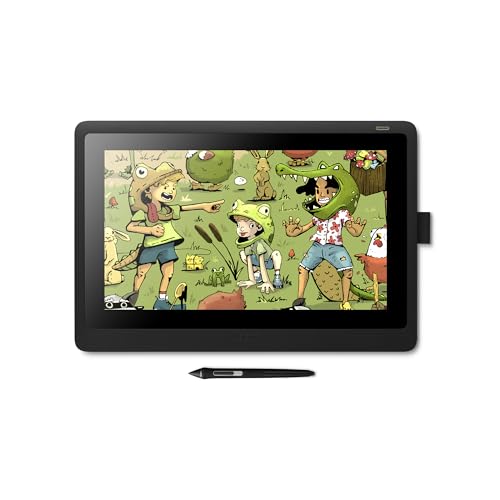
A pen display with a 15.4 inch Full HD screen and the Pro Pen 2, which has 8192 pressure levels, tilt recognition and 2 customizable switches.

Best for: Creative hobbyists, students and animators who want to draw on screen

Screen
15.4 in Full HD
Pen
Pro Pen 2, 8,192 levels, tilt
Connection
3-in-1 cable
Needs computer
Yes

Buy it if

  • You want to draw directly on the screen with a Wacom pen
  • You want tilt support for shading and 2 pen switches for shortcuts
  • You work on a Mac or Windows computer at a desk

Skip it if

  • You want a sharper screen. Full HD on 15.4 inches is less sharp than the 2560 x 1440 Huion Kamvas 16 (Gen 3)
  • You want to draw without a computer. It is a pen display, not a standalone tablet

What the Wacom Cintiq 16 is

The Wacom Cintiq 16 is a pen display: a 15.4 inch Full HD screen you draw on directly. It works with Windows and macOS computers and connects with a 3-in-1 cable.

It comes with Wacom's Pro Pen 2, which reads 8,192 pressure levels and tilt with near lag-free tracking. Wacom aims it at students, hobbyists and creative enthusiasts working on campus, in a studio or at home.

Key features, explained

Based on the manufacturer's Amazon listing.

  • Pro Pen 2 with 8,192 pressure levels and tilt

    Press harder for thicker lines and tilt the pen to shade. Wacom describes the tracking as virtually lag-free.

  • 2 customizable pen switches

    Set the buttons on the pen to shortcuts such as undo or the eraser, so you can keep your hand on the screen.

  • 15.4 inch Full HD display

    Wacom describes an LCD with HD resolution, uniform brightness and true-to-life color.

  • Relaxed parallax

    Parallax is the gap between the pen tip and the cursor. Wacom says the relaxed parallax, with the Pro Pen 2, makes creating feel as natural as drawing on paper.

  • 3-in-1 cable

    The box includes a 3-in-1 connectivity cable, an AC adapter and a power cable.

Wacom Cintiq 16 specifications

Type
Pen display (needs a computer)
Screen
15.4 in Full HD LCD
Pen
Pro Pen 2
Pressure levels
8,192
Tilt
Yes
Pen switches
2, customizable
Connection
3-in-1 cable
Works with
Windows and macOS
In the box
Cintiq 16, Pro Pen 2, 3 replacement nibs, nib remover, 3-in-1 cable, AC adapter, power cable, quick start guide
Model
DTK1660K0A
Warranty
1 year

Who the Wacom Cintiq 16 suits

  • Artists moving up from a screenless tablet. You see the line appear under the pen instead of on a separate monitor.
  • Art students. Wacom pitches it for students, hobbyists and enthusiasts on campus, in the studio or at home.
  • Animators and illustrators on Mac or PC. The listing names graphic design and animation, and the pen brings tilt, 8,192 pressure levels and 2 shortcut switches.

Look elsewhere if: you want a higher resolution screen with listed color coverage. The Huion Kamvas 16 (Gen 3) lists 2560 x 1440 resolution and 99% sRGB.

Wacom Cintiq 16 vs similar picks

  • Wacom Cintiq 16

    Screen
    15.4 in
    Resolution
    Full HD
    Pressure levels
    8,192
    Connection
    3-in-1 cable

    Choose it for: The Wacom Pro Pen 2

  • Huion Kamvas 16 (Gen 3)

    Screen
    15.8 in
    Resolution
    2560 x 1440
    Pressure levels
    16,384
    Connection
    3-in-1 or USB-C cable

    Choose it for: 2560 x 1440 and 99% sRGB listed

  • XPPen Artist Pro 16 Gen2

    Screen
    16 in
    Resolution
    2560 x 1600
    Pressure levels
    16,384
    Connection
    3-in-1 cable

    Choose it for: Stand and remote in the box

Before you buy

  • It needs a Mac or Windows computer. It does not work on its own.
  • It is wired. It connects with the 3-in-1 cable and runs on the included AC adapter.
  • The listing does not mention a stand or touch input, so plan for pen-only control on a desk.

Frequently asked questions about the Wacom Cintiq 16

Does the Wacom Cintiq 16 need a computer?
Yes. It is a pen display that connects to a Mac or Windows computer. It does not work on its own.
Is the Wacom Cintiq 16 wireless?
No. It connects with the included 3-in-1 cable, and an AC adapter and power cable come in the box.
Does the Wacom Cintiq 16 pen need charging?
The listing does not say whether the Pro Pen 2 has a battery or needs charging. It lists tilt recognition, 8,192 pressure levels and 2 customizable switches.
Is the Wacom Cintiq 16 a touch screen?
The listing does not list touch input. You control it with the Pro Pen 2 and its 2 customizable switches.
Wacom Cintiq 16 vs Huion Kamvas 16 (Gen 3): which should I buy?
The Cintiq 16 gives you Wacom's Pro Pen 2 with 8,192 levels on a Full HD screen. The Kamvas 16 (Gen 3) has a sharper 2560 x 1440 screen, 99% sRGB and a 16,384-level pen.
What pen does the Wacom Cintiq 16 use?
The Pro Pen 2, with tilt recognition, 8,192 pressure levels and 2 customizable switches. 3 replacement nibs and a nib remover come in the box.

More drawing tablets

See all

Wacom Cintiq 16

Check price