Finding the right drawing tablet feels overwhelming. Whether you’re a student, hobbyist, or professional, it’s easy to get stuck comparing options.
Choosing between Huion and XP-Pen can be confusing. Both brands offer tablets for every skill level and budget. Some come with screens, others are just pads. There are differences in pen feel, shortcut keys, and compatibility. Price jumps fast if you want more advanced features or a bigger screen.
Picking the wrong model could mean paying extra for things you don’t need or missing out on what matters most.
This article will help you understand the real differences, so you can decide what suits your needs without stress.
What Actually Matters When Choosing
Think about how you plan to use your tablet. If you sketch casually, portability and ease of use might matter more than screen quality. For detailed art or design, pressure sensitivity and color accuracy become important. Teaching or note-taking needs a reliable pen and quick shortcuts.
Knowing your main use will help narrow down what features are worth paying for.
Below, you’ll see a range of Huion and XP-Pen tablets. Each option fits a different situation—some are simple and affordable, others cater to more serious work. Compare what matters most for your workflow to find your match.
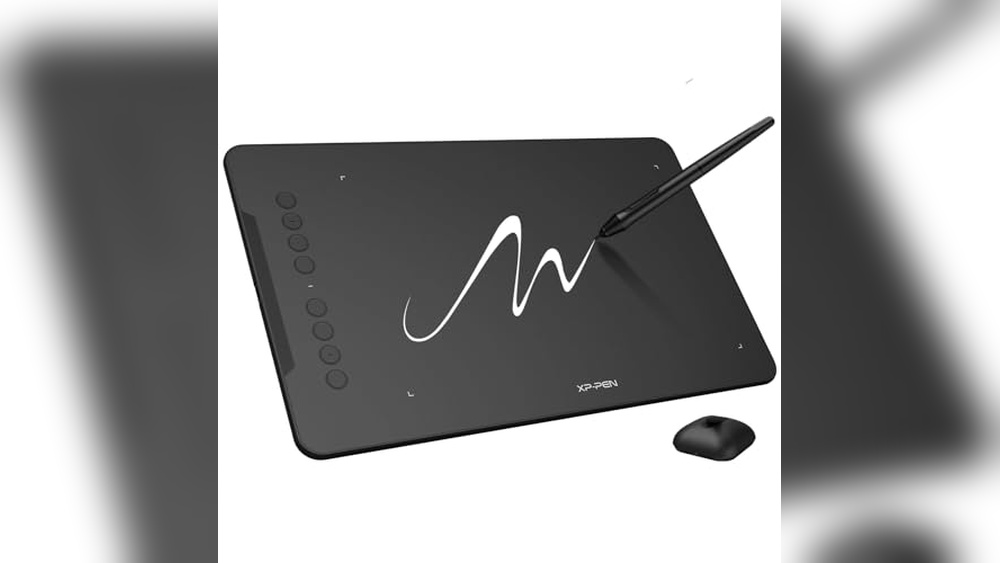
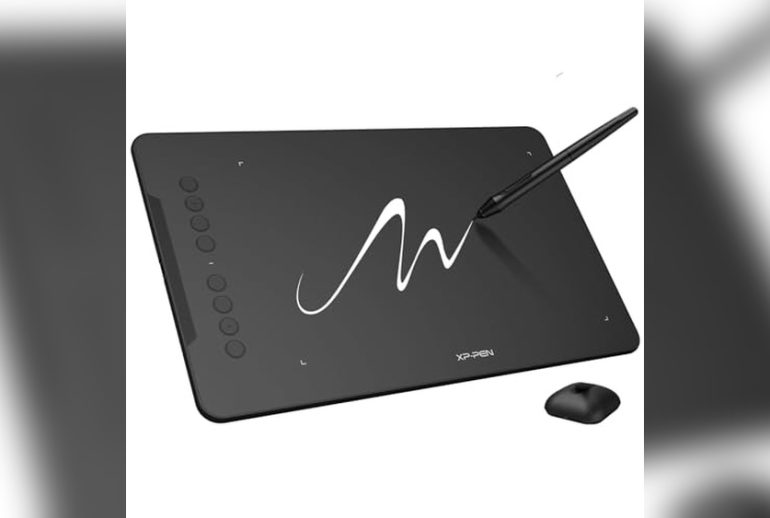
Xp-pen Deco 01 V3 Drawing Tablet
In the debate of Huion Vs Xp-Pen Drawing Tablet, this model is ideal for beginners, students, and hobbyists seeking a reliable entry into digital art or online teaching.

The XP-Pen Deco 01 V3 Drawing Tablet is a large, beginner-friendly graphics tablet designed for digital art, teaching, and gaming. Its standout feature is the stylus with 16,384 pressure levels—ensuring smooth, natural lines and shading that closely mimic traditional drawing tools, which makes it a strong contender in the Huion Vs Xp-Pen Drawing Tablet comparison.
In practice, the tablet’s large 10 x 6. 25-inch active area provides ample room for creativity without feeling cramped. With eight customizable hotkeys and easy connectivity to a range of devices—including Android, PC, Mac, and Chrome—it offers a seamless start for new users who want less fuss and more time to focus on creating.
- Strengths:
- High pressure sensitivity (16K levels) for detailed work
- Battery-free stylus for uninterrupted sessions
- Supports both left and right-handed users
- Android compatibility for use on the go
- Simple USB-C connectivity
- Limitations:
- No built-in display—requires a separate screen
- Large size may not fit smaller desks
Who Will Feel At Home With This Tablet?
If you’re new to digital drawing or want a straightforward device for teaching or annotating, this XP-Pen model removes much of the technical intimidation. It’s especially helpful for students, hobbyists, or teachers who want reliable performance without a steep learning curve.
Those who prefer a compact tablet or need a built-in display may want to look elsewhere. Everyone else will appreciate the generous workspace and the confidence that comes from simple, stable connections. A practical tip: take a few minutes to customize the hotkeys for your favorite shortcuts—it speeds up your process and helps you get comfortable quickly.
Rest assured, this tablet focuses on making creativity accessible, so you can spend less time troubleshooting and more time bringing your ideas to life.
Xp-pen Artist 13.3 Pro Drawing Tablet
For digital artists exploring the Huion Vs Xp-Pen Drawing Tablet debate, this model suits creators who want a screen-based experience with versatile compatibility.

The XP-Pen Artist 13. 3 Pro Drawing Tablet is a pen display device designed for digital illustrators and graphic designers who want to draw directly on a screen. It solves the common disconnect of drawing on a tablet while looking at a separate monitor, with its fully-laminated 13.
3-inch FHD display providing natural, paper-like pen feedback and vivid color accuracy (123% sRGB).
In day-to-day use, the included adjustable stand and 8 customizable shortcut keys let you set up a comfortable, streamlined workspace—so you’re not constantly reaching for your keyboard or squinting at washed-out colors. The tilt function adds to the realism, enabling smooth shading, and the compatibility with Windows, Mac, ChromeOS, and Linux means you can jump between different machines without worrying about driver headaches.
- Strengths:
- High color accuracy and wide viewing angles
- Natural drawing feel with 16384 pen pressure levels
- Fully-laminated screen reduces parallax
- Customizable dial and shortcut keys for workflow efficiency
- Compatible with major operating systems and creative software
- Limitations:
- Requires a connection to a computer (not standalone)
- Initial setup and cable management may take time
Is This The Right Drawing Tablet For You?
This tablet is an excellent choice for artists and students who want a drawing experience that feels close to pen-on-paper, especially if you need great color accuracy and customizable controls. If you’re constantly switching between different software or operating systems, the broad compatibility will give you peace of mind.
On the other hand, if you need a standalone device without a computer, or you want something ultra-portable, you may want to consider alternatives. But for most desktop or studio-based creators, this tablet removes the stress of lag, poor color, and awkward hand positioning. My tip: take a few minutes to customize your shortcut keys—doing so can shave hours off repetitive tasks, making your workflow smoother and more enjoyable.
Huion Inspiroy H950p Drawing Tablet
If you’re considering Huion Vs Xp-Pen Drawing Tablet, the H950P is ideal for artists, students, or professionals who need a portable and versatile digital drawing solution.

The Huion Inspiroy H950P Drawing Tablet is a compact digital art tablet that delivers a natural pen experience, thanks to its battery-free stylus with 8192 levels of pressure sensitivity. It solves the hassle of frequent charging and offers a portable solution for sketching, designing, or annotating wherever you go.
With its lightweight build and customizable hot keys, using the H950P feels intuitive and efficient whether you’re working at your desk or on the move. Switching between pen and eraser is seamless, and the tablet serves as a reliable mouse alternative for precise tasks or digital note-taking.
- Strengths:
- Battery-free stylus for uninterrupted creativity
- Eight customizable hot keys streamline workflow
- Compatible with Mac, Windows, Linux, and Android
- Compact, portable design for easy transport
- Supports left-handed users
- Limitations:
- No display screen—must be used with a computer or mobile device
- Medium size may not suit those wanting a larger working area
Should You Choose The H950p?
The Huion Inspiroy H950P is perfect for anyone seeking a reliable, portable drawing tablet with broad compatibility and customizable controls. If you work across different devices or need a tablet that fits limited desk space, this model keeps things simple and efficient.
If you prefer a tablet with a built-in screen or need a larger working area, you might want to look at other options. However, for most students, hobbyists, and professionals, the H950P removes the stress of battery management and setup, letting you focus on your work. A practical tip: customize the hot keys for your most-used shortcuts to save time and keep your workflow smooth. You can trust this tablet to be both sturdy and easy to use wherever you need it.
Xppen Magic 12.2″ Standalone Drawing Tablet
In the Huion Vs Xp-Pen Drawing Tablet debate, this standalone XPPen model is ideal for digital artists who want a powerful, computer-free drawing experience.

The XPPen Magic 12. 2″ Standalone Drawing Tablet is a portable, computer-free device designed for artists who want to create anywhere without being tied to a PC or Mac. Its 16K pressure level stylus offers an incredibly responsive drawing experience, making it a standout for those who demand precision and nuance in their digital artwork.
Using this tablet feels natural thanks to its paper-like screen and TÜV Rheinland certified eye comfort, so even long creative sessions are easy on your vision. The Android ecosystem and generous 8GB RAM/256GB storage mean you can work, save, and even install your favorite drawing apps directly on the device—giving you confidence that your workflow remains smooth and reliable wherever you go.
- Strengths:
- Fully standalone—no computer required
- Industry-leading 16K pressure level stylus for ultra-precise lines
- Paper-like, high-resolution 12.2″ screen with wide color gamut
- Eye comfort features for long drawing sessions
- Expandable storage up to 1TB
- Considerations:
- Runs on Android, so check compatibility with your preferred software
- Not suited for users who need desktop-class applications
Is This Xppen Tablet Right For You?
If you want freedom from your desk and dislike cables or computer connections, this XPPen tablet is a strong pick—especially for artists, students, and illustrators who value mobility and quick setup. Those who rely on desktop-only software might be better served by a traditional Huion or XPPen model that connects to a PC, but for most digital sketching, note-taking, and painting needs, this device removes a lot of stress and setup hassle.
Take a few minutes to explore the Android drawing apps available and make sure your favorites are supported. If you’re often on the move or want a tablet to keep up with your creativity wherever inspiration strikes, you’ll find this XPPen model both reassuringly capable and refreshingly simple to use.
Huion Kamvas 13 Gen 3 Drawing Tablet
If you’re comparing the Huion Vs Xp-Pen Drawing Tablet options, this device is a strong fit for digital artists, designers, and illustrators who want a reliable, color-accurate screen for creative work.

The HUION Kamvas 13 (Gen 3) is a 13. 3-inch drawing tablet with a fully laminated display and anti-sparkle canvas glass, designed to minimize glare and provide a comfortable drawing experience. It’s aimed at creative professionals who need precise pen control and color accuracy—making it a practical solution for those who want a step up from a basic graphics tablet with no screen.
In actual use, the tablet feels smooth and natural, with 16,384 pressure levels and responsive pen technology that make sketching, shading, and inking effortless. The color performance is impressive, and the display comes factory-calibrated for consistency, so you can focus on your work without worrying about mismatched tones or distracting reflections.
- Strengths:
- Exceptional pressure sensitivity and pen accuracy
- 99% sRGB color coverage for vivid and consistent artwork
- Anti-sparkle glass reduces glare and eye strain
- Factory-calibrated for color reliability
- Lightweight, portable design
- Limitations:
- Requires connection to a computer or laptop—cannot be used standalone
Is The Kamvas 13 Gen 3 Right For You?
If you want a drawing tablet with a screen and color accuracy similar to higher-end models, the Kamvas 13 Gen 3 is a reassuring choice—especially for artists who value seeing their work directly under the pen. It’s not for those who need a fully standalone device or absolute portability, but if you’re working at a desk with a laptop or desktop, it removes the guesswork from digital art and illustration.
For those comparing Huion Vs Xp-Pen Drawing Tablets, Huion’s color calibration and anti-glare technology stand out for long creative sessions. Just remember to check your computer’s compatibility, and you’ll have a reliable creative tool that helps you focus on your art, not on the hardware.
Xp-pen Artist Pro 16 Gen2 Drawing Tablet
For artists comparing Huion Vs Xp-Pen Drawing Tablet options, this XP-Pen model is ideal for those who need high color accuracy and a smooth drawing experience connected to a computer.

The XP-Pen Artist Pro 16 Gen2 is a 16-inch QHD drawing tablet designed for artists who want professional-level detail, thanks to its 16384 pressure levels and vibrant, full laminated anti-glare screen. This model solves the common frustration of parallax and inaccurate color reproduction, making it a solid choice for those who prioritize precision and comfort during long creative sessions.
In everyday use, the tablet feels smooth and responsive, with the X3 Pro battery-free stylus capturing even the most subtle pen pressure changes. Features like the ergonomic wrist rest, foldable stand, and wireless shortcut remote help reduce fatigue and make it easy to stay in your creative flow without constant interruptions.
- Notable strengths:
- 2.5K QHD resolution with anti-glare glass for minimal parallax
- Industry-leading 16K pressure sensitivity for nuanced strokes
- 99% sRGB color coverage and high color accuracy
- Ergonomic wrist support and foldable stand included
- Wireless shortcut remote for quick function access
- Potential limitations:
- Must be used with a computer or laptop (not standalone)
- Heavier than some alternatives (8.5 lbs)
Is This The Right Drawing Tablet For You?
If you’re weighing Huion Vs Xp-Pen Drawing Tablet for professional illustration, animation, or design, the Artist Pro 16 Gen2 stands out for its exceptional pressure sensitivity and color accuracy. It’s a strong fit for digital artists who want reliable performance and comfort, and who don’t mind connecting their device to a computer.
However, if you need a lightweight or truly portable drawing device, or you prefer a tablet that works independently from a PC, this model may not suit your workflow. One tip: set up your workspace with the included stand and wrist rest from the start—they really help with longer projects. Rest assured, for anyone focused on detail and color, this XP-Pen delivers a confident, consistent drawing experience.
Huion Inspiroy H640p Drawing Tablet
Comparing Huion Vs Xp-Pen Drawing Tablet, this Huion model is perfect for artists, students, and professionals looking for a compact, reliable digital drawing solution.

The Huion Inspiroy H640P is a slim and portable graphics tablet designed for digital drawing, writing, and design. If you’re tired of cramped workspace or want a device that easily travels between home, work, or school, its lightweight build and compact size solve that hassle.
The customizable 6 hot keys allow you to streamline your creative workflow, making tasks more efficient and less repetitive.
Using the H640P feels natural thanks to the battery-free stylus with 8192 levels of pressure sensitivity. It’s easy to switch between pen and eraser, and I found its accuracy and responsiveness reliable for both detailed artwork and quick note-taking. The tablet works smoothly across Mac, Windows, Linux, and Android (but not iOS), so you can use it in almost any digital setup without fuss.
- Strengths:
- Customizable hot keys for efficient workflow
- Battery-free stylus with natural pen feel
- Ultra-portable and lightweight
- Multi-OS compatibility (except iOS)
- Great for left-handed users
- Limitations:
- Does not support iOS devices
- Smaller workspace may not suit those needing large drawing areas
Who Will Benefit Most
If you need a graphics tablet for digital art, note-taking, or document signing and prefer a compact device that fits tight spaces, the Huion Inspiroy H640P is an excellent pick. It’s especially good for students, remote workers, and anyone who needs to move their tablet frequently.
If you require a larger drawing surface or need iOS compatibility, you might want to consider other options. Otherwise, this tablet removes the stress of cluttered desks and complicated setup—just plug in and start working. As a practical tip, take advantage of the customizable hot keys for your favorite shortcuts to save time and reduce repetitive strain.
You can feel confident that the H640P will keep up with your daily creative or professional needs.
Xp-pen Artist 13.3 Pro Drawing Tablet
For artists comparing Huion Vs Xp-Pen Drawing Tablet, this model is ideal for digital creators, students, and professionals seeking a versatile, screen-equipped tablet.

This XP-Pen tablet is a compact, fully-laminated device designed for drawing directly on a screen. It solves cable clutter with a single USB-C connection and delivers impressively precise pen control with industry-leading 16K pressure sensitivity, making it a strong choice for those who value accuracy and portability.
Using it feels natural, with minimal lag and a comfortable, textured surface thanks to its anti-glare film. The included foldable stand and customizable shortcut keys mean you can get set up quickly, stay organized, and focus on your art without distractions.
- Strengths:
- 16K pressure levels for superior pen precision
- Fully laminated screen reduces parallax and eye strain
- Wide compatibility: works with PC, Mac, Chromebook, and Android
- Red dial roller and express keys streamline workflow
- Dual-mode: use as either pen display or pen tablet
- Limitations:
- Requires USB3.1 DP1.2 for single-cable setup
- Legacy HDMI setup needs extra cable (not included)
- 13.3-inch screen may be small for some professionals
Is This The Right Tablet For You?
If you want a reliable drawing tablet that works seamlessly across multiple devices and offers natural pen performance, the XP-Pen Artist 13. 3 Pro is well-suited for digital art students, illustrators, and those working remotely. Its easy setup and comfortable build remove technical stress and let you start drawing quickly.
However, if you need a larger screen or your device lacks a compatible USB-C port, you might prefer a bigger model or check cable requirements first. For best results, keep the stand set up at a comfortable angle and try out the shortcut keys early—they save a lot of time once customized to your workflow.
Relax knowing the anti-glare screen and sturdy metal backing make long drawing sessions easier on your eyes and hands.
Xp-pen Starg640 6×4 Inch Drawing Tablet
In the Huion Vs Xp-Pen Drawing Tablet debate, this XP-Pen StarG640 is an excellent choice for students, digital artists, and remote workers seeking an affordable and portable graphics tablet.

The XP-Pen StarG640 is a slim, lightweight drawing tablet that’s designed to help you create digitally with ease, whether you’re an artist, student, or working from home. Its standout feature is the battery-free stylus, so you never have to worry about charging it—just plug in and start sketching, annotating, or signing documents right away.
In daily use, the G640 feels natural and reliable, especially if you’re used to a mouse but want more control for drawing or note-taking. Its compact size means it fits easily on any desk or can travel with you, so you’re always ready to draw or jot down ideas.
Compatibility with Mac, Windows, and Chromebook adds flexibility and confidence for different users and environments.
- Pros:
- Battery-free stylus—no charging needed
- Works with Mac, Windows, and Chromebook
- Lightweight and ultra-thin for portability
- Great for drawing, e-learning, and online meetings
- Limitations:
- Small active area (6×4 inches) may not suit those needing a larger workspace
- No built-in shortcut keys
| Key Spec | XP-Pen StarG640 |
|---|---|
| Active Area | 6 x 4 inches |
| Stylus | Battery-free |
| Compatibility | Mac, Windows, Chromebook |
| Thickness | 2 mm |
| Weight | ~0.37 lbs |
Should You Choose The Xp-pen Starg640?
If you want a budget-friendly, reliable drawing tablet for digital art, online teaching, or remote work—and you value portability and simplicity—the StarG640 is a great fit. It’s especially helpful for students or professionals who need to sign documents, take handwritten notes, or sketch on the go.
However, if you prefer a larger workspace or need extra features like shortcut keys, you may want to look at other options. The XP-Pen StarG640 keeps things simple, removing worries about charging or technical hassles. My practical tip: keep the stylus handy and use it for both creative and productivity tasks—you’ll likely find it becomes a natural part of your workflow.
Xp-pen Artist 12 3rd Gen Drawing Tablet
In the Huion Vs Xp-Pen Drawing Tablet debate, this tablet is ideal for digital artists and students seeking a lightweight, portable option with professional-grade features.

The XP-Pen Artist 12 3rd Gen is a compact drawing tablet with a laminated 11. 9-inch screen and a high-precision X4 pen, designed to make digital art creation smoother and more enjoyable. With its dual X-Dial wheels for instant brush and canvas adjustments, it helps artists save time and avoid workflow interruptions, making it an attractive choice for those who sketch on the go or work in tight spaces.
In practice, the paper-like AG etched glass feels comfortable for long drawing sessions, and the color-accurate display delivers vibrant, reliable results for illustration or design work. Setup is simple across Windows, Mac, and even Android or ChromeOS, so switching between devices or collaborating with others is hassle-free.
- Ultra-portable: Only 1.58 lbs and thin, easy to carry between classes or workplaces.
- Reliable pen experience: The X4 Pen offers 16,384 pressure levels and tilt support, with a magnetic attachment to prevent loss.
- Professional color accuracy: 99% sRGB and factory calibration for consistent results.
- Universal compatibility: Works with Windows, macOS, Android, ChromeOS, Linux, and tested with top creative software.
- Reduced eye strain: AG etched glass reduces glare and fingerprint smudges.
Should You Pick The Xp-pen Artist 12 3rd Gen?
If you want a reliable drawing tablet that travels well and works across nearly any device, this model is a strong choice for both students and professionals. Artists who value pen responsiveness, color accuracy, and customizable controls will find it particularly freeing for everyday use or long creative sessions.
Those who need a larger screen or built-in multitouch may want to look elsewhere. But if portability and a natural drawing feel matter more than extra features, this tablet cuts out a lot of decision stress. A simple tip: keep the extra pen nibs handy, and enjoy the confidence of a display that keeps your eyes comfortable even on deadline days.
Xp-pen Pa2 Battery-free Stylus For Artist Pro Tablets
In the Huion Vs Xp-Pen Drawing Tablet debate, this stylus is ideal for XP-Pen users seeking precise, battery-free performance on compatible Artist Pro models.

The XP-Pen PA2 stylus is designed specifically for users of XP-Pen Artist Pro series drawing tablets, offering a battery-free operation so you can sketch, shade, and design without worrying about charging interruptions. With its advanced 8192 levels of pressure sensitivity, this stylus helps artists capture subtle variations and fine details in their work, making it a solid solution for those who demand accuracy.
In practice, the PA2 stylus feels lightweight and comfortable, letting you focus more on your art and less on the tools. The tilt function supports natural shading, so transitions between lines are smooth and lifelike. For anyone who spends hours drawing, the freedom from battery concerns and the precision it provides is a real boost to workflow and confidence.
- Strengths:
- No batteries or charging required—uninterrupted drawing sessions.
- High pressure sensitivity for nuanced sketches and lines.
- Tilt support for natural shading and brush control.
- Lightweight and comfortable to hold.
- Limitations:
- Only compatible with specific XP-Pen Artist Pro tablets (12 Pro, 13.3 Pro, 15.6 Pro, 22R Pro, 24 Pro).
- Will not work with Huion tablets or non-Pro XP-Pen models.
Who Will Benefit Most
If you own an XP-Pen Artist Pro series tablet and value uninterrupted creative sessions, this stylus is a smart upgrade or replacement. It’s especially suited for illustrators, designers, and students who need reliable, precise input without worrying about battery life or compatibility issues.
However, if you use a Huion tablet or a different XP-Pen model, this stylus won’t work for you—double-check your device before purchasing.
By focusing only on compatible models, the PA2 removes the stress of mismatched accessories and wasted money. For best results, keep your workspace tidy and store the stylus safely to prevent misplacement. You can trust this stylus to deliver consistent performance every time you sit down to create.
Huion Kamvas Pro 16 Drawing Tablet
If you’re comparing Huion Vs Xp-Pen Drawing Tablet, the Kamvas Pro 16 is ideal for digital artists, designers, and illustrators seeking a reliable screen tablet for creative work.

The Huion Kamvas Pro 16 is a pen display tablet with a 15. 6-inch anti-glare, full-laminated screen designed for artists, designers, and anyone who prefers drawing directly on a display. It addresses the challenge of precision and comfort, offering smooth texture and vivid color accuracy for professional work.
In daily use, the adjustable stand and customizable shortcut keys make long sessions more comfortable and efficient. The pen feels natural and responsive, helping you focus on creating rather than fiddling with settings—saving time and reducing frustration.
- Strengths:
- Excellent color accuracy (120% sRGB, 1000:1 contrast ratio)
- 6 express keys and touch bar for shortcut access
- Adjustable stand reduces neck and back strain
- Works with Windows, Mac, and Linux
- Battery-free pen with tilt support
- Limitations:
- Requires connection to a computer
- No built-in multi-touch support
- Physical size may be bulky for smaller desks
Is The Kamvas Pro 16 Right For You?
This tablet is best suited for digital artists, illustrators, and professionals who want a reliable, color-accurate drawing display that works across major operating systems. If you prefer drawing directly on the screen and need customizable shortcuts, it’s a solid choice.
Those seeking maximum portability or standalone operation might consider alternatives.
The clear screen, ergonomic stand, and responsive pen help eliminate common frustrations like glare, awkward angles, and laggy strokes. Tip: Take advantage of the express keys for your most-used tools—they genuinely speed up workflow. You can feel confident that this tablet handles demanding creative tasks without distraction.
How To Weigh Your Options For A Drawing Tablet
Think about your workflow and how much portability you need. Consider whether you prefer drawing directly on a screen or are comfortable working on a pen tablet without a display. Decide how much you value compatibility with different operating systems and software.
Be honest about your experience level and how much learning curve you are willing to handle. It’s less about specs and more about how a device fits your habits and daily needs.
Common Missteps When Picking A Drawing Tablet
- Overestimating the need for advanced features if you are a beginner.
- Assuming every tablet works without a computer or is compatible with all devices.
- Choosing by pressure levels alone, rather than comfort and workflow.
- Not checking software compatibility for your favorite creative programs.
- Believing a larger screen or more shortcut keys always means better results.
Huion Vs Xp-pen Drawing Tablet: Frequently Asked Questions
Is One Brand More Reliable For Long-term Use?
Both brands are generally reliable and have loyal users. Longevity often depends more on handling and use than brand choice.
Do Huion And Xp-pen Tablets Work With The Same Software?
Most popular art software supports both brands. Still, it’s good to double-check for the specific model you are considering.
Are Driver Issues More Common With One Brand?
Driver issues can happen with either brand, especially after OS updates. Reading recent user feedback for your operating system is wise.
Does A Screen Tablet Make A Big Difference Compared To A Non-screen Tablet?
Drawing on a screen can feel more natural to some, but others adjust quickly to non-screen tablets. It mostly comes down to personal preference and budget.
Can I Use These Tablets With My Android Device?
Some models from both brands support Android, but not all. Always check compatibility details before buying if this matters to you.
Which Is Better For Beginners, Huion Or Xp-pen?
Both offer beginner-friendly options. Focus on ease of setup and support resources rather than the brand name alone.
Will I Need To Buy Extra Accessories?
Many tablets include the basics, but extras like stands or replacement nibs may be needed over time. Check what’s included in the package before deciding.
Choosing A Drawing Tablet: A Grounded Decision
There is no perfect choice for everyone, but there is a good fit for your situation. Take your time to reflect on how each option matches your habits and comfort level.
Once you have clarity on your real needs, the right drawing tablet will stand out naturally. Trust your own process and move forward with peace of mind.