Last Updated: April 2026 · Reviewed by Ethan Cole
Affiliate Disclosure: We may earn a commission through the affiliate links below at no extra cost to you. See our full earnings disclaimer.
Buying your first drawing tablet can feel overwhelming. There are dozens of brands, sizes, and price points to sort through – and every product page promises it’s “the best.” We’ve tested and compared 20+ tablets to cut through the noise and find the ones that actually make sense for beginners.
The best drawing tablet for beginners depends on your budget and what you want to do. If you want a reliable all-rounder, the XPPen Deco 01 V3 gives you a huge drawing area and 16K pressure sensitivity for under $60. For the tightest budget, the GAOMON S620 costs less than a dinner out. And if you want the trusted industry standard, the Wacom Intuos Small still holds its own despite stiffer competition.
Below, we break down our top 9 picks across every category – from budget screenless tablets to standalone devices that don’t need a computer at all.
Quick Comparison Table
| Tablet | Category | Price | Pressure | Area / Screen |
|---|---|---|---|---|
| XPPen Deco 01 V3 | Best Overall | ~$60 | 16,384 | 10 x 6.25″ |
| GAOMON S620 | Best Budget | ~$27 | 8,192 | 6.5 x 4″ |
| Wacom Intuos Small | Best Mid-Range | ~$80 | 4,096 | 6 x 3.7″ |
| XPPen Artist 12 (2nd Gen) | Best Screen (Budget) | ~$200 | 8,192 | 11.9″ display |
| Huion Inspiroy H640P | Best for Kids/Teens | ~$35 | 8,192 | 6.3 x 3.9″ |
| XPPen Deco MW | Best Portable | ~$55 | 8,192 | 8 x 5″ |
| Huion Inspiroy 2 L | Best Large | ~$100 | 8,192 | 10 x 6″ |
| Huion Kamvas 13 (Gen 3) | Best Screen (Mid) | ~$224 | 16,384 | 13.3″ display |
| XPPen Magic Drawing Pad | Best Standalone | ~$449 | 16,384 | 12.2″ display |
1. XPPen Deco 01 V3 – Best Overall for Beginners
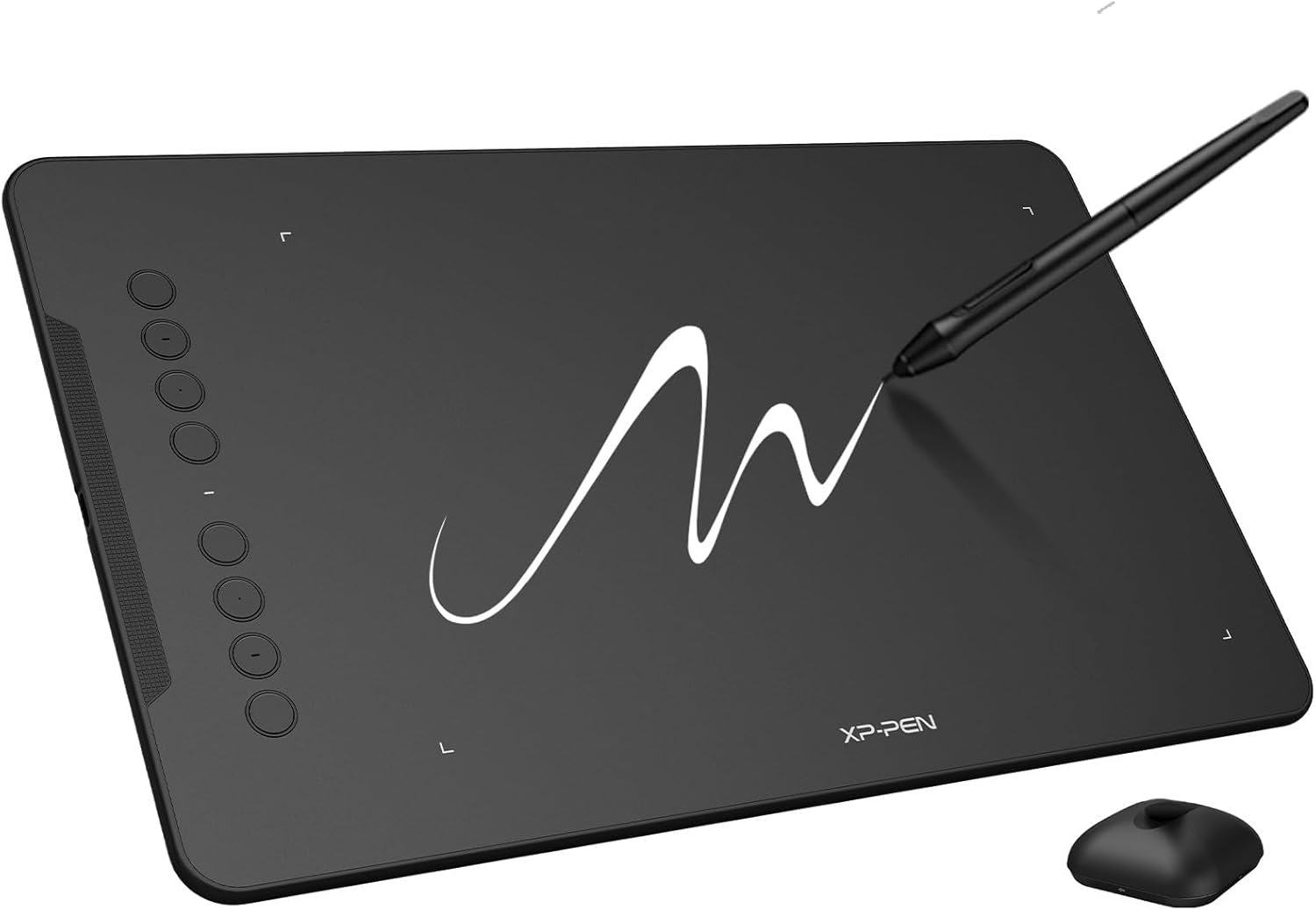
The XPPen Deco 01 V3 is our top pick because it gives you more drawing space and better specs than tablets costing twice as much. With a 10 x 6.25-inch active area and 16,384 levels of pressure sensitivity, it matches features you’d find on professional-grade tablets.
Setup is plug-and-play on Windows, Mac, Chrome OS, and even Android phones. The eight customizable hotkeys let you assign shortcuts for undo, brush size, and zoom without touching your keyboard. The battery-free stylus supports 60-degree tilt, which means natural shading just by angling your pen.
Why We Picked It
16K pressure levels, 10×6″ active area, tilt support, and 8 hotkeys for under $60. No other tablet at this price comes close to matching those specs.
Specs: 10 x 6.25″ active area | 16,384 pressure levels | 60-degree tilt | 8 hotkeys | Battery-free stylus | 220 RPS report rate | Windows, Mac, Chrome OS, Android
2. GAOMON S620 – Best Budget Drawing Tablet
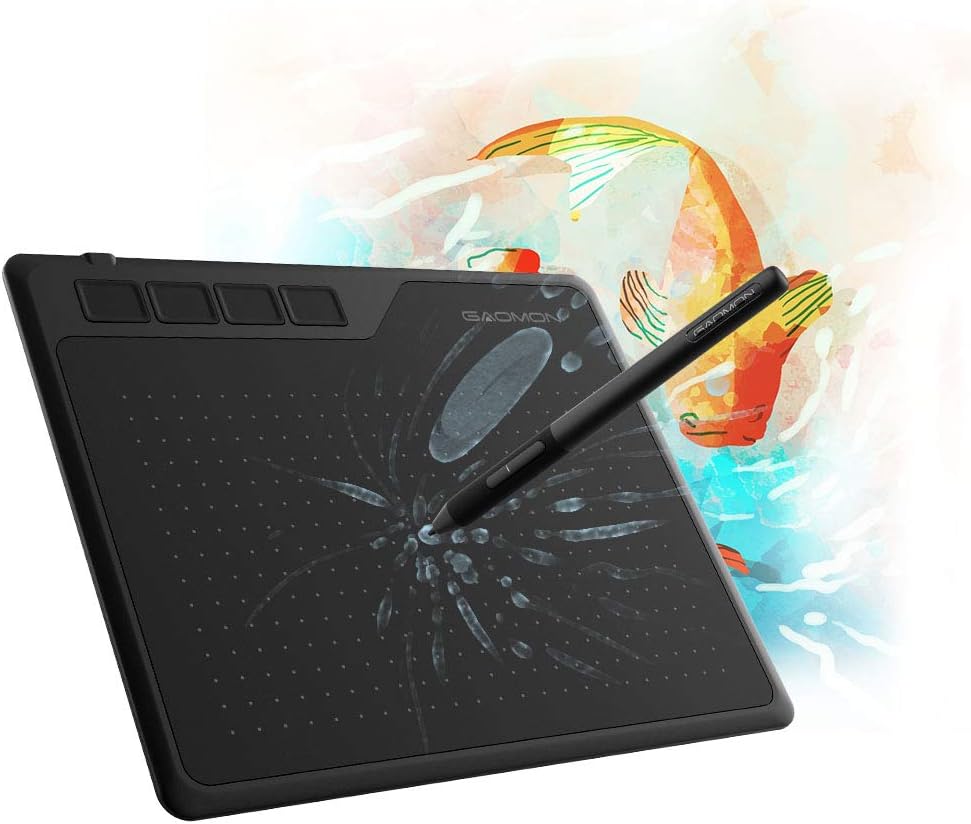
If you’re not sure whether digital art is for you, the GAOMON S620 is the safest way to find out. At around $27, it costs less than most art supply hauls – and it’s genuinely usable, not a throwaway toy.
The 6.5 x 4-inch drawing area is compact but workable for sketching and note-taking. You get 8,192 levels of pressure sensitivity, four customizable express keys, and a battery-free pen. It’s also a popular pick among osu! players who want a responsive tablet on a tight budget.
The tradeoff is size. The small active area can feel cramped for detailed illustrations. But for testing the waters, quick sketches, or kids’ first tablets, nothing at this price point competes.
Specs: 6.5 x 4″ active area | 8,192 pressure levels | 4 express keys | Battery-free pen | 5,080 LPI | Windows, Mac, Android
3. Wacom Intuos Small (CTL4100) – Best Mid-Range Pick
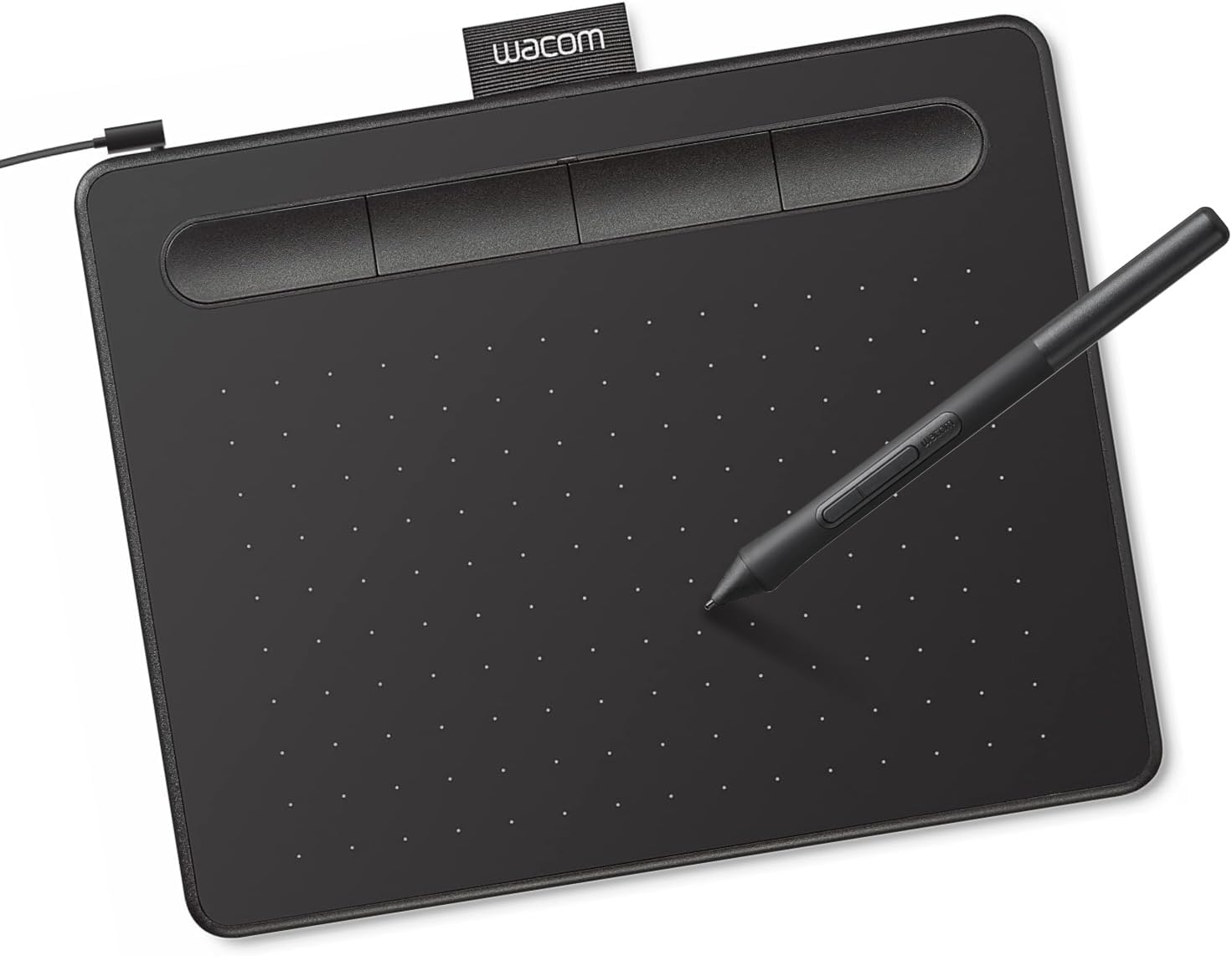
Wacom invented the modern pen tablet, and the Intuos Small is still the gold standard for beginners who want something reliable. The build quality is noticeably better than Chinese competitors – the pen feels balanced, the surface texture is pleasant, and the drivers are rock-solid on every OS.
On paper, the specs look modest compared to newer competition: 4,096 pressure levels and a 6 x 3.7-inch active area. But Wacom’s pen technology has always been about the feel of drawing, not just numbers. The initial activation force is low, the pressure curve is natural, and there’s virtually zero lag.
The real bonus is the software bundle. Wacom includes free licenses for Clip Studio Paint (2 years), Corel Painter Essentials, and Corel AfterShot – easily $100+ worth of software. If you’re buying your first cheap drawing tablet, that bundle alone justifies the price.
Pro Tip
The Bluetooth version (CTL4100WL) costs about $20 more. Worth it if you hate cable clutter, but the wired version is perfectly fine for desk setups.
Specs: 6 x 3.7″ active area | 4,096 pressure levels | 4 express keys | Battery-free pen | 2,540 LPI | Windows, Mac, Chrome OS, Android
4. XPPen Artist 12 (2nd Gen) – Best Pen Display for Beginners
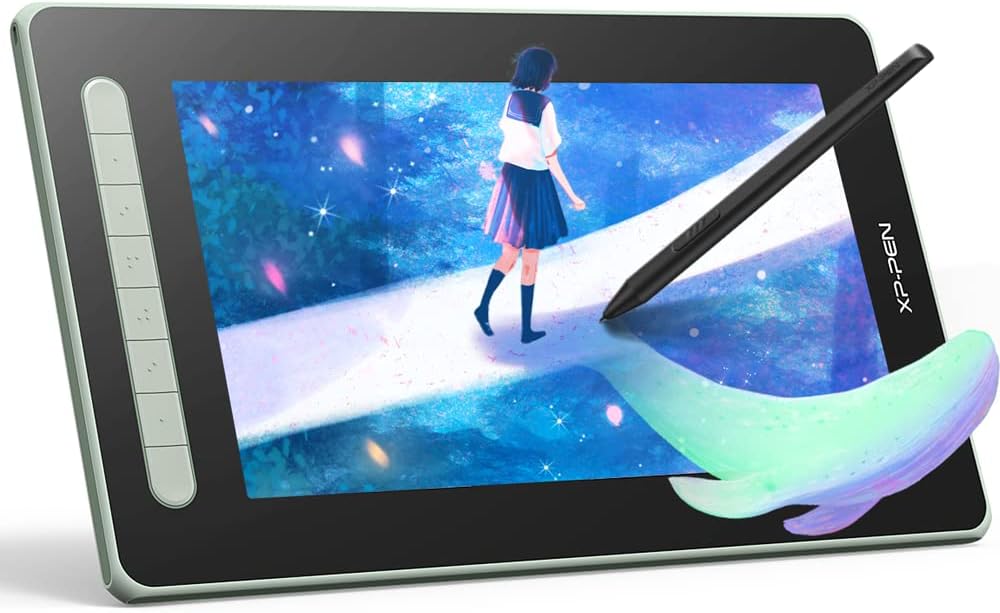
Drawing on a screenless tablet means looking at your monitor while your hand moves on the desk below. It takes practice, and some people never get comfortable with the disconnect. A pen display solves this completely – you draw directly on the screen, just like paper.
The XPPen Artist 12 (2nd Gen) is the most affordable fully-laminated pen display worth buying. Full lamination means the glass sits flush against the display panel, so there’s virtually no gap between your pen tip and the cursor. Cheaper pen displays without this tech feel like you’re drawing above the screen, not on it.
The 11.9-inch Full HD screen covers 127% sRGB, which is more than enough color accuracy for illustration and design work. The X3 Smart Chip stylus is lighter and more responsive than the previous generation. For more options with screens, check our guide to the best standalone drawing tablets.
Specs: 11.9″ Full HD IPS display | 127% sRGB | Full lamination | 8,192 pressure levels | 60-degree tilt | X3 stylus | 8 hotkeys | Windows, Mac, Chrome OS, Linux
5. Huion Inspiroy H640P – Best for Kids and Teens
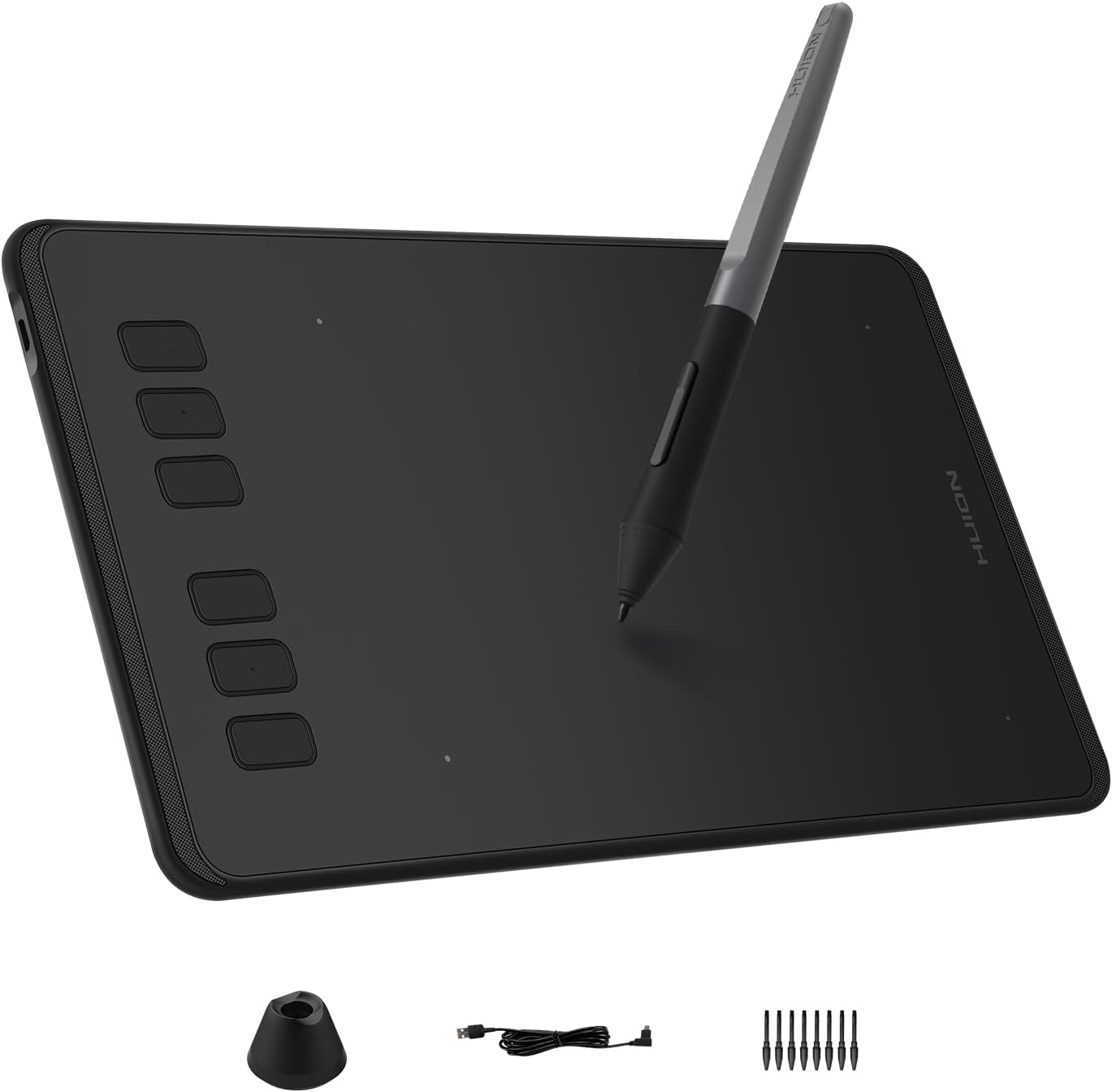
Kids and teens need something that won’t break the bank when it inevitably gets tossed in a backpack, but still performs well enough to keep them interested. The Huion Inspiroy H640P nails that balance.
At around $35, it’s cheap enough to give as a birthday gift without stress. But it punches way above its price with 8,192 pressure levels and a battery-free stylus – specs that beat the Wacom Intuos on paper. The compact 6.3 x 3.9-inch surface fits naturally on a small desk or lap.
It also works with Android phones and tablets, which is a big deal for teens who might not have a dedicated computer. Pair it with a free app like ibis Paint X on a phone and they have a complete digital art setup for under $40. For more options targeted at younger artists, see our best drawing tablet for teenagers roundup.
Specs: 6.3 x 3.9″ active area | 8,192 pressure levels | 6 hotkeys | Battery-free stylus with tilt | 5,080 LPI | 233 PPS | Windows, Mac, Linux, Android
6. XPPen Deco MW – Best Portable Drawing Tablet
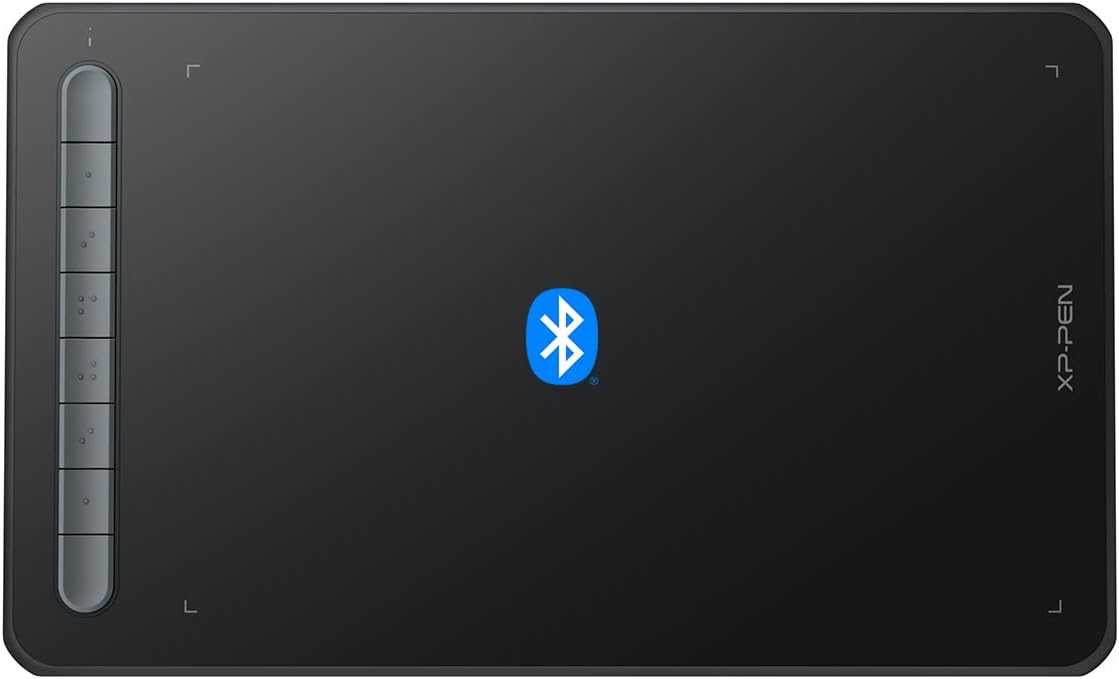
The Deco MW is for anyone who wants to sketch on the couch, at a coffee shop, or in bed without wrestling with cables. Bluetooth 5.0 connectivity and a built-in 1,000 mAh battery give you 10+ hours of wireless drawing per charge.
The 8 x 5-inch active area hits a sweet spot – big enough for comfortable strokes, small enough to slip into a bag. The X3 Smart Chip stylus has the lowest initial activation force in XPPen’s lineup, meaning it picks up the lightest touches. Eight shortcut keys round out the feature set.
If you want a drawing tablet without a screen that gives you complete freedom of movement, this is the one to get.
Specs: 8 x 5″ active area | 8,192 pressure levels | Bluetooth 5.0 | 1,000 mAh battery | X3 stylus | 60-degree tilt | 8 hotkeys | Windows, Mac, Chrome OS, Linux, Android
7. Huion Inspiroy 2 L – Best Large Drawing Tablet
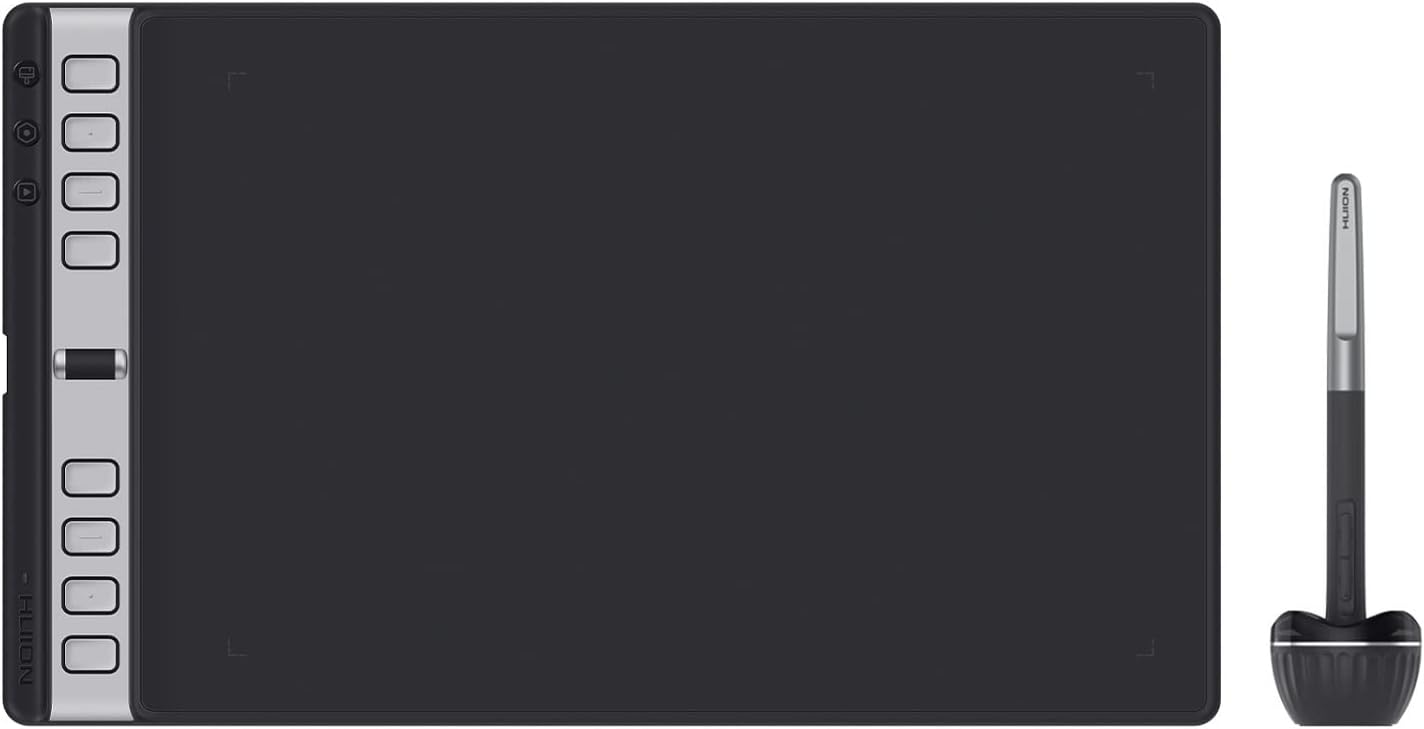
Small tablets force you to make tiny, cramped strokes. If you like drawing with your whole arm – or if you plan to do detailed illustrations – a larger active area makes a massive difference.
The Huion Inspiroy 2 L gives you a 10 x 6-inch workspace, the biggest you’ll find under $100. But the standout feature is the scroll wheel. Being able to zoom in and out without keyboard shortcuts is something you don’t realize you need until you have it. The 3-group hotkey system gives you 24 programmable shortcuts across three switchable profiles.
Huion also added 20% more surface friction compared to the previous generation, giving the pen-on-tablet feel closer to pencil-on-paper. For a deep dive into our experience with Huion drawing tablets, check our dedicated review.
Specs: 10 x 6″ active area | 8,192 pressure levels | Scroll wheel | 8 hotkeys (3 groups = 24 total) | PenTech 3.0 | Tilt support | Windows, Mac, Linux, Chrome OS, Android
8. Huion Kamvas 13 (Gen 3) – Best Mid-Range Pen Display
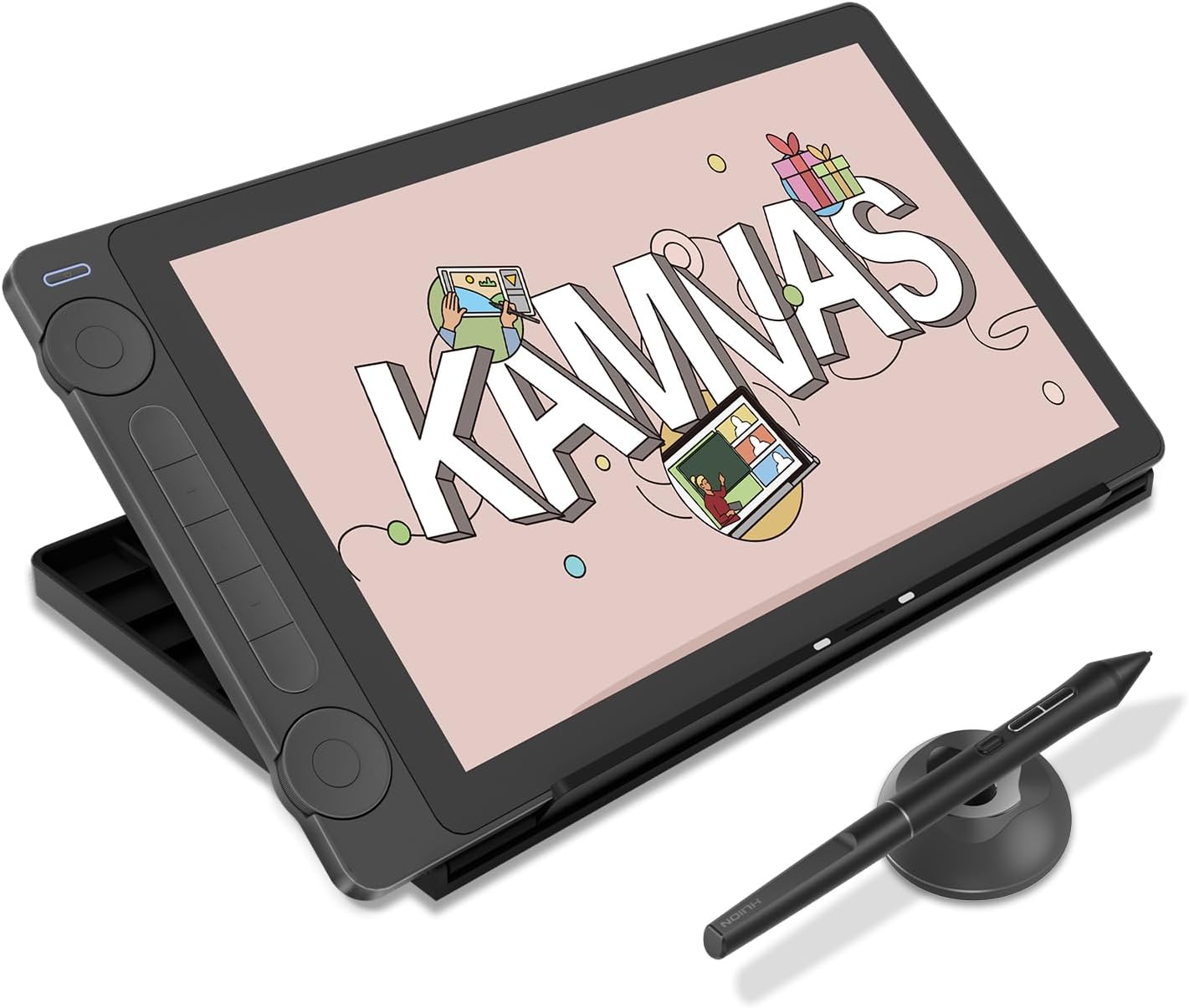
If you want a pen display but the XPPen Artist 12 feels too small or too basic, the Huion Kamvas 13 Gen 3 is the upgrade that makes sense. It’s widely considered the best value pen display on the market in 2026.
The 13.3-inch Full HD screen uses Anti-Sparkle Canvas Glass 2.0 – a nano-etched surface that kills reflections without making the image look dull. Combined with full lamination, the drawing experience feels remarkably close to pen on paper. The PenTech 4.0 stylus pushes pressure sensitivity to 16,384 levels with only 2g of initial activation force.
Two physical dials replace the need for keyboard shortcuts when zooming or adjusting brush size. This is a big deal because pen displays take up desk space, and reaching for a keyboard while drawing on-screen is awkward. For more affordable drawing tablet options, see our full guide.
Our Take
If your budget can stretch to ~$225, the Kamvas 13 Gen 3 is the best beginner pen display. The combo of 16K pressure, Canvas Glass 2.0, and dual dials at this price point is unmatched.
Specs: 13.3″ Full HD IPS | 99% sRGB | Full lamination | Anti-Sparkle Canvas Glass 2.0 | 16,384 pressure levels | PenTech 4.0 | Dual dials + 5 hotkeys | Windows, Mac, Android
9. XPPen Magic Drawing Pad – Best Standalone Tablet
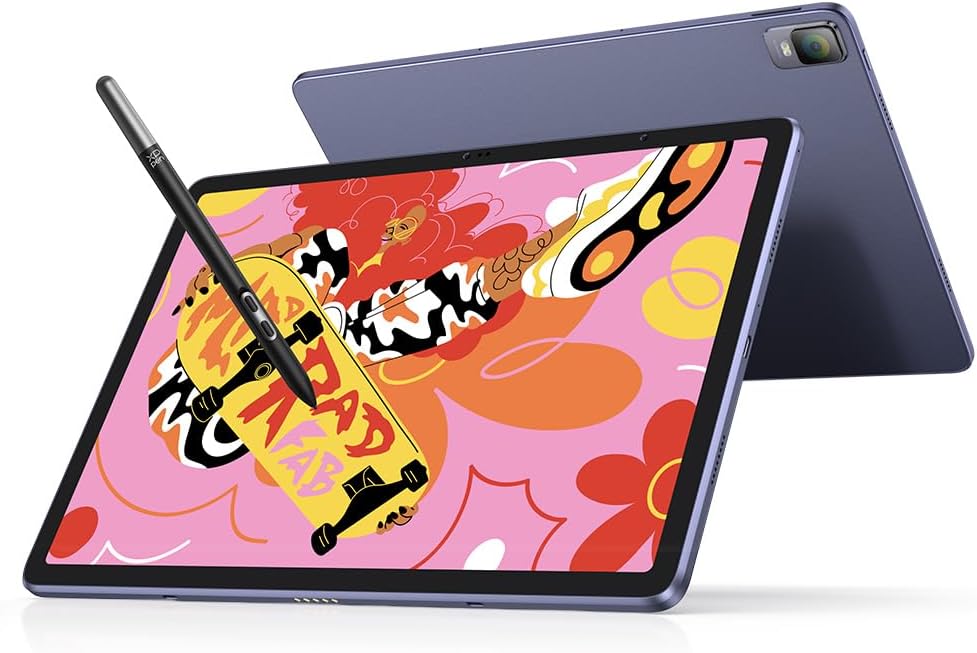
Every other tablet on this list needs a computer. The XPPen Magic Drawing Pad doesn’t. It runs Android 14, has its own 12.2-inch 2K display, and comes with 8GB RAM and 256GB storage. Pick it up and draw – no cables, no computer, no setup.
The X3 Pro Slim stylus delivers 16,384 pressure levels and 60-degree tilt. The paper-like screen texture gives real resistance under the pen. And the 8,000 mAh battery lasts up to 13 hours of continuous drawing.
At around $450, it’s a serious investment for a beginner. But compared to an iPad Pro ($1,099) plus Apple Pencil Pro ($129), it’s actually a bargain for a device built specifically for drawing. It comes with ibis Paint X pre-installed and a free membership. You can also install Clip Studio Paint, MediBang, and any other Android art app from the Play Store. Read our full XPPen Magic Drawing Pad review for a detailed breakdown.
Specs: 12.2″ 2K QHD display | Standalone Android 14 | 8GB RAM + 256GB storage | X3 Pro Slim stylus | 16,384 pressure levels | 60-degree tilt | 8,000 mAh battery | 6.9mm thin | 599g
How We Chose These Tablets
We evaluated each tablet based on five criteria that matter most for beginners:
- Ease of setup – Plug-and-play tablets scored higher. Beginners shouldn’t spend an hour troubleshooting drivers.
- Drawing feel – Pressure curve, pen weight, surface texture, and how natural it feels to sketch.
- Value for money – Specs relative to price. A $30 tablet with 8K pressure levels beats an $80 tablet with 4K levels.
- Software compatibility – Works with popular free and paid drawing software (Krita, Clip Studio Paint, Photoshop, Procreate alternatives).
- Build quality – Durable enough to survive daily use without the pen nib wearing down in a week.
Screen vs. No Screen – Which Should a Beginner Choose?
This is the biggest decision you’ll make. Here’s the honest breakdown:
Screenless tablets ($25-$100) – You draw on a flat surface while looking at your computer monitor. There’s a learning curve (usually 1-2 weeks) to coordinate hand and eye movements. But once you’re past it, many professional artists actually prefer screenless tablets because they don’t block the screen, cause less neck strain, and last longer.
Pen displays ($190-$450+) – You draw directly on the screen, just like paper. The learning curve is nearly zero. However, they cost 3-5x more, generate heat during long sessions, and you might find yourself hunching over the screen.
Our recommendation: start with a screenless tablet unless you absolutely know you’ll hate the eye-hand disconnect. The best cheap drawing tablets under $60 are so good now that you’re not compromising much. If you outgrow it, you can always upgrade to a pen display later.
What Size Drawing Tablet Do You Need?
Small (6 x 4″ or less) – Best for note-taking, signatures, osu!, and kids. Can feel cramped for detailed art.
Medium (8 x 5″ to 10 x 6″) – The sweet spot for most beginners. Enough room for comfortable strokes without taking over your desk.
Large (10 x 6″ and above) – Best for detailed illustration, animation, or anyone who draws with full arm movements. Needs a bigger desk.
When in doubt, go medium. The XPPen Deco 01 V3 and Huion Inspiroy 2 L both fall in this range and cover most use cases.
Frequently Asked Questions
Do I need a computer for a drawing tablet?
Most drawing tablets require a computer – they act as an input device like a mouse. The exception is standalone tablets like the XPPen Magic Drawing Pad, which runs its own Android operating system and doesn’t need a computer at all. Some tablets also work with Android phones and tablets.
What software should I use with my first drawing tablet?
Start with free software. Krita is a full-featured open-source painting app that rivals paid alternatives. ibis Paint X (free, mobile and desktop) is great for beginners. If you buy a Wacom Intuos, you get Clip Studio Paint free for 2 years. Once you’re comfortable, consider Clip Studio Paint Pro ($50 one-time) or Adobe Photoshop (subscription).
How many pressure levels do I actually need?
For beginners, 4,096 pressure levels are perfectly fine. You won’t notice a difference between 4K and 8K in daily use. The jump to 16,384 levels is mostly about marketing, though professionals who do precise line weight work may appreciate the extra granularity.
Is Wacom still worth it in 2026?
Wacom still makes the best drivers and has the most natural pen feel. But brands like XPPen and Huion now offer equal or better specs for less money. If driver stability and the software bundle matter to you, Wacom is worth the premium. If you want raw value, go XPPen or Huion. Check our Wacom drawing tablet review for a deeper look.
Can I use a drawing tablet with my phone?
Yes, most modern tablets from XPPen, Huion, and GAOMON support Android phones via USB-C OTG. You’ll need a compatible phone (most Android phones from 2020+ work) and a drawing app like ibis Paint X. Apple iPhones are not supported by any tablet brand.
Do drawing tablets work with Chromebooks?
Several do, including the XPPen Deco 01 V3, Wacom Intuos, and XPPen Deco MW. Look for tablets that specifically list Chrome OS compatibility. You’ll also need a Chrome OS-compatible drawing app like the web version of Sketchpad or the Android version of ibis Paint from the Play Store. We cover some options in our Linux-compatible drawing tablets guide.
How long do drawing tablets last?
A quality drawing tablet lasts 5-10 years easily. The tablet itself rarely breaks. What wears out is the pen nib (the plastic tip), which costs $5-10 to replace and comes with spares in the box. Wacom tablets are known for lasting the longest, but Huion and XPPen have caught up significantly in build quality.
Which Drawing Tablet Is Right for You?
Here’s the quick decision guide:
- Just want to try digital art: GAOMON S620 (~$27) – lowest risk, solid performance
- Best bang for the buck: XPPen Deco 01 V3 (~$60) – our #1 pick for a reason
- Want the trusted brand: Wacom Intuos Small (~$80) – best drivers and free software
- Wireless freedom: XPPen Deco MW (~$55) – Bluetooth, 10+ hour battery
- Need a big workspace: Huion Inspiroy 2 L (~$100) – scroll wheel is a game-changer
- Want to draw on-screen: Huion Kamvas 13 Gen 3 (~$224) – best value pen display
- No computer at all: XPPen Magic Drawing Pad (~$449) – fully standalone
For most beginners, we recommend starting with the XPPen Deco 01 V3. It’s the best combination of performance, features, and price. You get a professional-level drawing experience without spending professional-level money.