Artists face a crucial decision: choosing between a drawing tablet and an iPad. Each offers unique benefits for creativity.
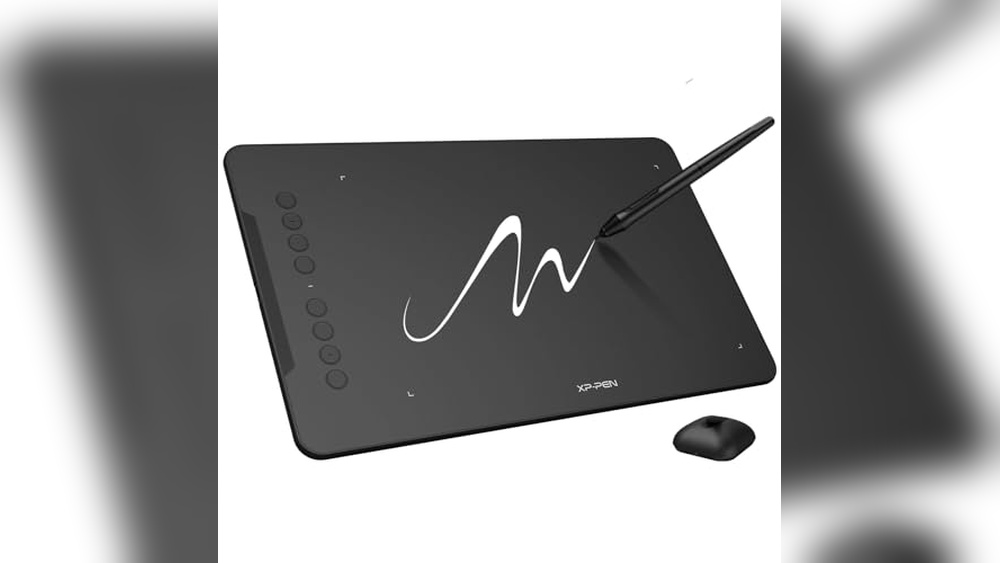
Drawing tablets and iPads are popular tools for digital artists. The choice between them can significantly impact an artist’s workflow and creative expression. Drawing tablets, like the XPPen and HUION models, offer high pressure sensitivity and customizable keys. They are built specifically for artistic tasks, providing precision and flexibility.
On the other hand, iPads offer portability and versatility, with apps designed for drawing and other functions. For artists who value mobility and multitasking, iPads can be appealing. Each option has its strengths, depending on individual needs and preferences. Understanding these differences helps artists make informed choices that enhance their creative endeavors.
Xppen Drawing Tablet With Screen

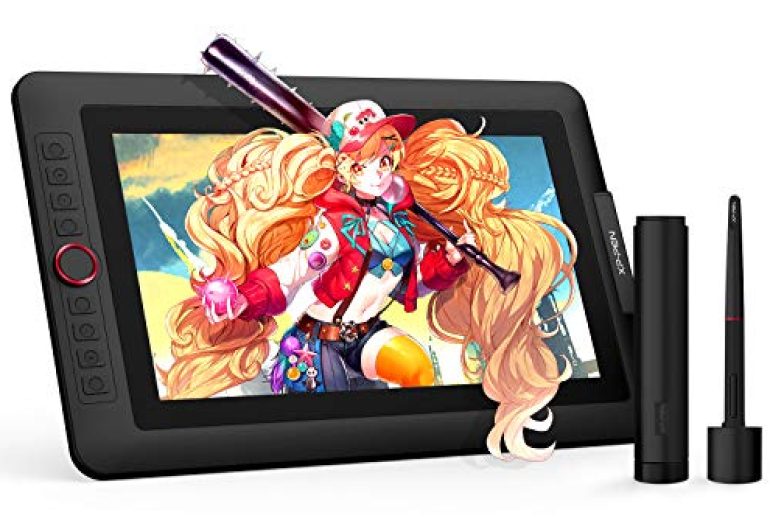
The XPPen Drawing Tablet with Screen is an excellent choice for digital artists, graphic designers, and creative professionals looking for a reliable and high-quality drawing tool. Whether you’re a beginner or an experienced artist, this tablet offers features that cater to various skill levels, making it ideal for anyone passionate about digital art and design.
Pros:
- Full-Laminated Screen reduces parallax, providing a more accurate drawing experience.
- 8192 Levels of Pen Pressure ensure precise and responsive pen strokes.
- 123% sRGB Color Gamut for vibrant and true-to-life colors.
- Adjustable Stand enhances comfort during long drawing sessions.
- 8 Shortcut Keys improve workflow efficiency.
Cons:
- Heavier Weight at 4.4 pounds may not be ideal for portability.
- Screen Size of 13.3 inches might be limiting for some users.
The XPPen Artist13.3 Pro Graphics Tablet is designed with a full-laminated screen that significantly reduces parallax, allowing artists to create with enhanced accuracy and confidence. This feature is particularly beneficial for detailed artwork where precision is crucial. Additionally, the 8192 levels of pen pressure sensitivity offer an incredibly responsive drawing experience, capturing the slightest nuances in pen strokes, which is essential for creating intricate designs or smooth shading.
With a 123% sRGB color gamut, the tablet ensures that your artwork is displayed in vibrant and true-to-life colors. This is especially important for artists who require color accuracy for their projects. The inclusion of an adjustable stand provides customizable viewing angles, promoting comfort during extended use. Also, the 8 shortcut keys are strategically placed to streamline your workflow, allowing you to access your most-used functions quickly and efficiently, making this tablet a versatile tool for any digital artist.
To buy this product, click here.
Digital Drawing Glove 2 Pack
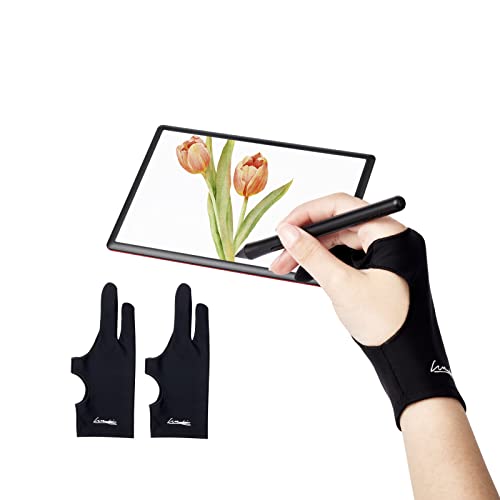
The Digital Drawing Glove 2 Pack is an essential tool for artists, illustrators, and digital creators who frequently use drawing tablets, iPads, or engage in sketching. These gloves are perfect for anyone looking to improve their digital art experience by preventing unwanted smudges and providing a smooth glide over the screen. Whether you’re a professional artist or a hobbyist, this glove is designed to enhance your creativity and precision.
Pros:
- Prevents smudges on your tablet or paper, keeping your work clean and professional.
- Ambidextrous design, suitable for both right and left-handed users.
- The two-finger design provides maximum flexibility and comfort.
- Lightweight and breathable material ensures comfort during long drawing sessions.
Cons:
- Limited size options, which might not fit everyone perfectly.
- Basic color choice, only available in black.
The Digital Drawing Glove 2 Pack features a smudge guard that is particularly beneficial for artists who work on touch-sensitive devices. The guard ensures that your hand movements do not interfere with your artwork by leaving unwanted marks or smudges. This is particularly advantageous for illustrators and graphic designers who demand precision in their work. Also, the glove’s two-finger design allows for greater flexibility and movement, letting you focus more on your creativity and less on adjusting your hand position.
Another notable feature of these gloves is their lightweight and breathable material, which offers comfort even during prolonged use. This is crucial for artists who spend hours perfecting their creations. The glove’s fabric is designed to reduce friction between your hand and the drawing surface, allowing for smoother strokes and enhanced control. This makes the Digital Drawing Glove 2 Pack a worthy investment for anyone serious about their digital artistry.
To buy this product, click here.
Huion Inspiroy H1060p Graphics Drawing Tablet

The HUION Inspiroy H1060P Graphics Drawing Tablet is ideal for digital artists, graphic designers, and illustrators who seek a reliable and versatile tool for creating stunning artwork. Whether you are a beginner exploring digital art or a professional looking to enhance your creative process, this tablet offers the features and flexibility you need to bring your ideas to life.
Pros:
- 8192 Pressure Sensitivity provides precise control over brush strokes.
- Battery-Free Stylus eliminates the need for charging and ensures uninterrupted creativity.
- 12 Customized Hot Keys for quick access to frequently used functions.
- Compatible with Mac, Windows PC, and Android devices.
Cons:
- May have a learning curve for users new to graphics tablets.
- Driver installation can be tricky on some operating systems.
The HUION Inspiroy H1060P stands out with its 8192 pressure sensitivity, allowing artists to achieve incredible precision and detail in their work. This feature is crucial for digital painting and sketching, providing a natural pen-on-paper feel that enhances artistic expression. Additionally, the battery-free stylus ensures that your creative flow is never interrupted by the need to recharge, offering a seamless drawing experience.
Beyond its impressive sensitivity, the tablet’s 12 customized hot keys are a big help for efficiency, enabling artists to streamline their workflow by assigning shortcuts to frequently used functions. The tablet’s compatibility with Mac, Windows PC, and Android devices adds to its versatility, making it a valuable tool for artists who work across multiple platforms. With dimensions that offer a generous drawing area, the HUION Inspiroy H1060P provides ample space for creativity without compromising portability.
To buy this product, click here.
Max Smart Tablet Drawing Stand

The MAX SMART Tablet Drawing Stand is perfect for digital artists, graphic designers, and illustrators who need a reliable and versatile stand for their graphics drawing monitors and art tablets. With its adjustable and foldable design, this stand is ideal for professionals and hobbyists who require a stable platform to create their art with precision and comfort.
Pros:
- Adjustable angles for customized viewing and drawing comfort.
- Foldable and portable design for easy transportation and storage.
- Compatible with 9 to 16 inches graphics drawing monitors and art tablets.
- Made with high-quality materials for durability.
Cons:
- Limited to 9 to 16 inches devices, not suitable for larger tablets.
- Black color might not match all workspace aesthetics.
The MAX SMART Tablet Drawing Stand offers a range of adjustable angles, allowing users to find the perfect position for drawing or viewing. This feature is particularly beneficial for reducing strain on the neck and wrists, enabling longer and more comfortable drawing sessions. Its foldable nature means that it can be easily packed away when not in use, saving valuable desk space and making it an excellent choice for artists who work in multiple locations.
Constructed with high-quality materials, this stand ensures durability and stability, which are essential for creating detailed artwork. The sleek black design complements most modern tech gadgets, though it may not suit everyone’s taste. Weighing just under a pound, it’s lightweight yet strong, making it a practical tool for artists who prioritize both functionality and portability.
To buy this product, click here.
Huion Inspiroy H640p Drawing Tablet

The HUION Inspiroy H640P Drawing Tablet is ideal for digital artists, designers, and educators looking for a compact, efficient tool to enhance their creative or teaching workflows. Whether you’re a seasoned professional or a beginner seeking a versatile device for drawing, writing, or designing, this tablet offers a range of features to support your creative endeavors across Mac, PC, and mobile platforms.
Pros:
- Battery-free stylus for uninterrupted creativity.
- 8192 pen pressure sensitivity for precise strokes.
- Six customizable hot keys to enhance productivity.
- Lightweight and portable design for easy travel.
Cons:
- Small drawing area may not suit all artists.
- Limited compatibility with some older operating systems.
The HUION Inspiroy H640P includes an impressive 8192 levels of pen pressure sensitivity, allowing users to create detailed and nuanced artwork with ease. This feature is particularly beneficial for artists and designers who require precise control over their strokes and shading techniques. The battery-free stylus ensures you can work without the hassle of charging, offering uninterrupted creativity when inspiration strikes.
With six customizable hot keys, the tablet is designed to streamline your workflow by providing quick access to your most-used tools and shortcuts. This can significantly enhance productivity, allowing users to focus more on their creative processes rather than navigating through software menus. Also, its lightweight design makes it an excellent choice for professionals on the go, easily fitting into a backpack or laptop bag without adding extra bulk.
To buy this product, click here.
Xppen Artist13.3 Pro V2 Drawing Tablet

The XPPen Upgraded Artist13.3 Pro V2 Drawing Tablet is perfect for digital artists, graphic designers, and illustrators who are looking for a compact, high-performance drawing tablet with a screen. If you’re someone who values precision, color accuracy, and customization in your digital artwork, this tablet is specifically designed for you.
Pros:
- 16384 Pen Pressure sensitivity for smooth and precise drawing.
- 99% sRGB Full-Laminated AG Screen offers excellent color accuracy.
- Red Dial and 8 Shortcut Keys enhance productivity and workflow.
- Comes with a stand for ergonomic drawing.
Cons:
- May be considered expensive for beginners.
- Requires compatibility check with your operating system.
- Weight may be a factor for portable use.
The Artist13.3 Pro V2 features a high-pressure sensitivity of 16384, which allows artists to capture even the slightest variations in pen pressure, enabling the creation of intricate and detailed artwork. This makes it ideal for professionals who need precision in their design work. Also, the full-laminated screen ensures minimal parallax, providing a closer mimic to traditional drawing experience.
With its 99% sRGB color accuracy, the tablet delivers vibrant and true-to-life colors, which are essential for graphic designers who require exact color representation. The Red Dial and 8 shortcut keys are customizable, allowing users to tailor their workflow for maximum efficiency. Additionally, the included stand promotes a comfortable drawing posture, reducing strain during long creative sessions.
To buy this product, click here.
Parblo Pr 100 Universal Drawing Tablet Stand
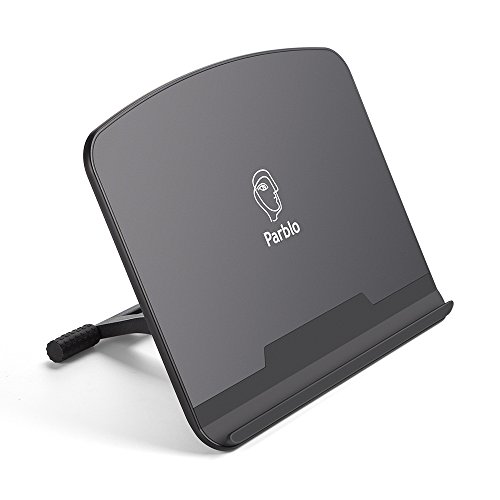
The Parblo PR 100 Universal Drawing Tablet Stand is perfect for artists, designers, and digital creators who frequently use digital graphics drawing monitors or art tablets ranging from 10 to 16 inches. This stand is ideal for those looking to enhance their workstation ergonomics and improve their drawing posture, making it an excellent investment for professionals and hobbyists alike.
Pros:
- Adjustable to accommodate various tablet sizes and angles.
- Lightweight design for easy portability.
- Durable construction ensures stability and longevity.
- Non-slip surface to keep your device secure.
Cons:
- Limited to devices between 10 to 16 inches.
- Black color may not suit all aesthetic preferences.
The Parblo PR 100 offers an impressive range of adjustability, allowing users to customize the angle of their device for optimal viewing and drawing comfort. This feature is particularly beneficial for those who spend long hours working on their digital creations, as it helps prevent strain and fatigue. The stand’s sturdy build ensures that even the heaviest of tablets remain securely in place, providing peace of mind during intense creative sessions.
Additionally, the stand’s lightweight and compact dimensions make it easy to transport, making it a versatile choice for artists on the go. Its non-slip surface adds an extra layer of security, ensuring that your device stays put even during the most vigorous drawing sessions. Whether you’re working in a studio or out in the field, the Parblo PR 100 is designed to support your creative endeavors with ease and reliability.
To buy this product, click here.
Xoppox Graphics Drawing Tablet
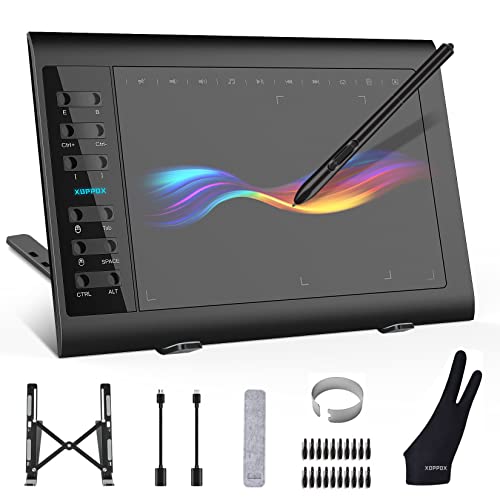
The XOPPOX Graphics Drawing Tablet is perfect for artists, designers, and educators who seek a high-performance tool to enhance their digital creativity. This tablet is ideal for those who require a large active area and a battery-free pen for seamless drawing and teaching experiences. Whether you are a professional or a hobbyist, this tablet offers the versatility and functionality to improve your digital artwork or teaching presentations.
Pros:
- 8192 levels of pressure sensitivity for precise and detailed artwork.
- 12 customizable hot keys for increased productivity and efficiency.
- Compatible with PC, Mac, and Android OS, offering flexibility across devices.
- Battery-free pen eliminates the need for charging and is environmentally friendly.
- Large 10 x 6-inch active area provides ample space for creativity.
Cons:
- Slightly heavier at 2.65 pounds compared to some other tablets.
- May have a learning curve for users new to digital tablets.
The XOPPOX Graphics Drawing Tablet includes a large 10 x 6-inch active area, offering artists and designers ample room to express their creativity without feeling constrained. This spacious working area is particularly beneficial for creating detailed artwork, making broad strokes, and ensuring comfortable hand movements. Coupled with the 8192 levels of pressure sensitivity, users can achieve incredible precision and control, allowing for nuanced shading and intricate designs that mimic traditional drawing tools.
An outstanding feature of this tablet is its battery-free pen, which not only eliminates the hassle of charging but also promotes an environmentally conscious choice. This pen, combined with the 12 customizable hot keys, enhances workflow by allowing users to assign shortcuts and frequently used functions, thus saving time and increasing productivity. The compatibility with PC, Mac, and Android OS further underscores its versatility, making it a preferred choice for users across different platforms, whether for professional use or online teaching.
To buy this product, click here.
Wacom Intuos Medium Bluetooth Graphics Drawing Tablet
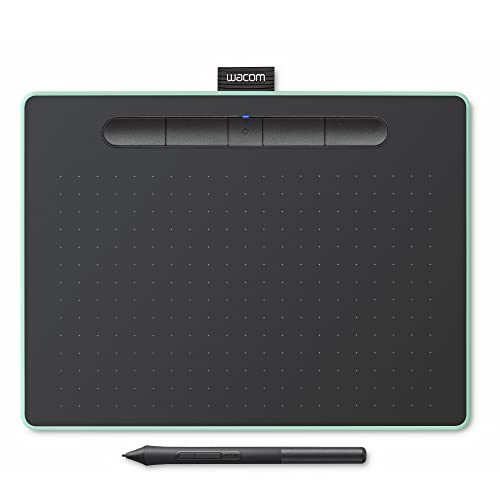
The Wacom Intuos Medium Bluetooth Graphics Drawing Tablet is ideal for teachers, students, and creators seeking a versatile and portable tool to enhance their digital artwork or presentations. This tablet is perfect for individuals who require a reliable, high-quality device that well integrates with various operating systems including Chromebook, Mac OS, Android, and Windows.
Pros:
- Bluetooth connectivity for wireless convenience
- Portable and lightweight design
- 4 customizable ExpressKeys for personalized shortcuts
- Compatibility with multiple operating systems
Cons:
- Limited active area compared to larger models
- Requires regular charging due to Bluetooth usage
The Bluetooth connectivity feature of the Wacom Intuos Medium allows users to work without the hassle of wires, providing freedom to move and work from any location. This is especially beneficial for teachers and students who may need to transition between different environments, such as classrooms and home settings. The portable and lightweight design further enhances this flexibility, making it easy to carry in a backpack or briefcase.
A standout feature of this tablet is its 4 customizable ExpressKeys, which enable users to set up personalized shortcuts, boosting productivity and efficiency. This is particularly advantageous for creators who often rely on repetitive tasks during their creative process. Additionally, its broad compatibility ensures that users can integrate the tablet into their existing tech ecosystem without any hassle, allowing seamless transitions between different platforms.
To buy this product, click here.
Drawing Tablet Xppen Starg640

The Drawing Tablet XPPen StarG640 is an excellent choice for aspiring artists, students engaged in e-learning, and professionals who require a reliable tool for remote-working. Its compact size and versatile compatibility make it ideal for those who need a portable and efficient drawing solution without breaking the bank.
Pros:
- Battery-free stylus means uninterrupted drawing sessions.
- Compact design makes it easy to carry and set up anywhere.
- Wide compatibility with Mac, Windows, and Chromebook.
Cons:
- Limited drawing area might not suit professional illustrators.
- Lacks advanced features found in higher-end tablets.
The XPPen StarG640 has a battery-free stylus, allowing users to work continuously without the hassle of recharging or replacing batteries. This feature is particularly beneficial for students and professionals involved in e-learning and remote-working, as it ensures a seamless and uninterrupted workflow. Additionally, the stylus is lightweight and comfortable to hold, providing precision and control for detailed artwork or annotations.
Its compact design ensures that users can easily slip it into their bags, making it a convenient tool for those on the go. Despite its small size, the tablet offers a 6×4 inch drawing area, which is perfect for sketching, writing notes, or editing documents. Also, the wide compatibility with Mac, Windows, and Chromebook systems means users can effortlessly integrate it into their existing setups, enhancing productivity across different platforms.
To buy this product, click here.
Frequently Asked Questions
Is A Drawing Tablet Better Than An Ipad For Artists?
Drawing tablets offer precision with high pen pressure sensitivity, making them ideal for professional artists. IPads provide versatility with apps and portability. The choice depends on your preference for specialized tools or a multi-purpose device.
What Are The Benefits Of A Drawing Tablet?
Drawing tablets provide high pressure sensitivity and customizable hotkeys. They offer a natural drawing experience and are compatible with various software. These features make them ideal for detailed and professional art projects.
Can Ipads Replace Drawing Tablets For Artists?
IPads offer portability and a range of apps for artists. However, they lack the high pen pressure sensitivity of drawing tablets, which is crucial for detailed work. For professional artists, a drawing tablet might be more suitable.
Are Drawing Tablets Compatible With All Devices?
Most drawing tablets are compatible with Mac, Windows, and Android devices. However, check the specific model’s compatibility before purchasing. Compatibility ensures you can use the tablet with your preferred operating system without issues.
How Does Pen Pressure Affect Drawing Quality?
Pen pressure sensitivity allows for varied line thickness and opacity, enhancing drawing realism. Higher pressure levels offer more control and precision. This feature is essential for artists seeking detailed and expressive art.
Choosing between a drawing tablet and an ipad depends on your artistic needs. Both offer unique advantages. Drawing tablets, like those from xppen and huion, provide precise control and pressure sensitivity. They are ideal for detailed work and professional use.
Tablets with screens, such as the artist13. 3 pro, enhance the drawing experience. They allow artists to see their work directly under the pen. On the other hand, ipads offer versatility and portability. With apps like procreate, they are great for sketching on the go.
They also serve multiple functions beyond drawing, which can be a bonus for multi-taskers. Consider your style and budget. If portability and multifunctionality are key, an ipad might suit you. If precision and a wide range of features are more important, a drawing tablet could be the better choice.
Ultimately, both tools can significantly enhance your creativity. The choice is personal and should align with your artistic journey.